There is no single industry-wide average ad approval time by format, and any page that gives you one number for push, pop and display is guessing. What you can plan around in 2026 is what drives review speed: the format, the vertical, the creative and the landing page.
- No network publishes a verified average ad approval time by format in 2026, so treat any single number with suspicion.
- On EZmob, every new campaign goes through creative moderation before it goes live.
- Vertical and landing page decide approval speed more than format does.
- Launch with clean creatives and a compliant landing page to avoid resubmissions.
Why this matters
Approval time is dead time. Your budget is funded, your tracker is set up, and nothing is spending. For media buyers testing on a small budget, a delay of a day or two can cost you a launch window, a promo or a seasonal offer.
The average ad approval time by format is also a number nobody can source cleanly. Networks do not publish moderation queue data, and review time depends on queue load, vertical and how many times a creative gets bounced. This page covers what is known and what to do about the rest.
The short answer
Expect review to be a gate, not a formality, on every format. On EZmob, new campaigns go through creative moderation before launch, whether you run pop, push, display, native or video. The format does not skip the step.
No verified figure for hours or days per format is published here, because none exists that holds across networks. Anyone quoting a precise average is either measuring one network in one week or inventing it.
What affects approval time, format by format
The table compares what moderators look at on each format and what usually causes a bounce. It is qualitative on purpose.
| Format | What gets reviewed | Common reasons for rejection or delay | Best for |
|---|---|---|---|
| Push notifications | Title, description, icon, landing page | Misleading urgency, fake system alerts, icon that mimics a device message | Fast testing of offers |
| Popunder / pop | Landing page above all | Forced downloads, deceptive pages, redirect chains | CPA and affiliate offers |
| Direct click | Destination page | Parked-page mismatch, restricted content | Keyword-intent traffic |
| Display / banner | Banner image and sizes, landing page | Flashing or deceptive visuals, wrong sizes, claims you cannot support | Brand and retargeting |
| Native | Headline, thumbnail, landing page | Clickbait headline, mismatch between ad and page | Content-led offers |
| Video | Video file, first frames, landing page | Misleading footage, restricted content | Higher-engagement creatives |
The pattern is consistent: the landing page is reviewed on every format. A clean creative on a bad page still fails.
Vertical beats format
A push campaign for a mainstream software trial and a push campaign for a supplement do not get the same scrutiny. Restricted or claim-heavy verticals get closer review, which means more rounds and more waiting.
- Adult: extra rules on creative and targeting. See how long adult ad campaign approval takes.
- Nutra: health claims are the usual blocker. See how to get nutra offers approved on ad networks.
- Sweepstakes, crypto, gambling and finance: moderators check for misleading promises and licensing context.
If you run a restricted vertical, budget extra time. Verdict: plan for a longer first launch, then reuse approved assets.
How review works in practice
The flow is the same across formats. You submit, moderation reviews, you either get approved or fix and resubmit, and then the campaign goes live.
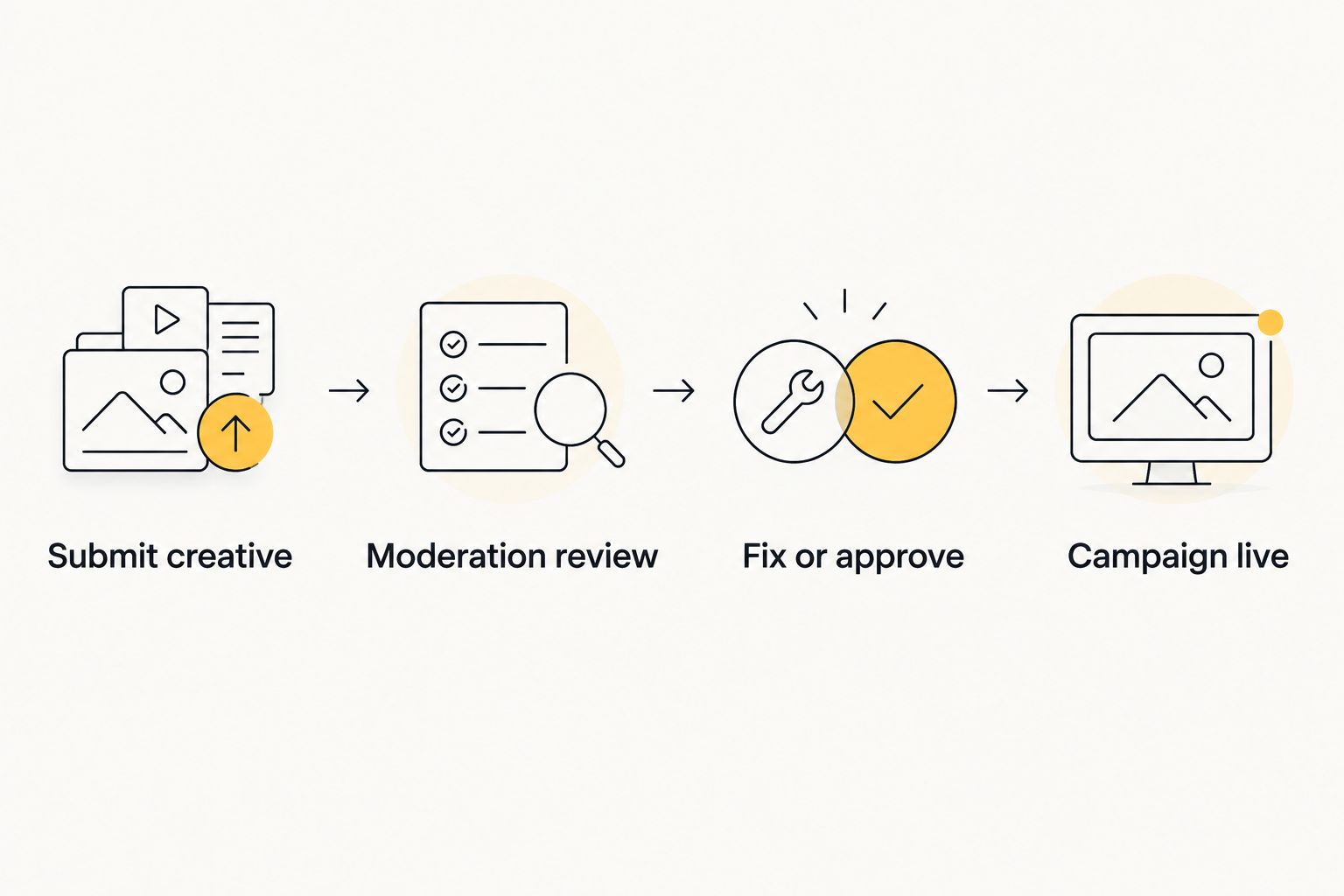
The loop is where time disappears. One rejection means a full second pass through the queue, not a quick edit.
How to get approved faster
- Match ad and page. The headline, offer and landing page must say the same thing. Mismatch is the most avoidable rejection.
- Drop fake UI. No fake system alerts, fake close buttons or imitation device notifications.
- Submit a small, clean batch. A few compliant creatives beat a large batch where one violation stalls everything.
- Keep claims you can back up. Especially in nutra, finance and gambling.
- Test before you scale. Approve one set, then iterate. See how to test push ad creatives before scaling a campaign.
Limits of this page
This is not a benchmark of measured hours. No dataset of approval times by format was available, so none is shown. If you need hard numbers for planning, track your own: log the submission time and the live time for each campaign over a month and you will have a better average than any third-party figure.
For format selection beyond approval speed, popunder vs push traffic for nutra offers shows how the two behave on a claim-heavy vertical.
FAQ
What is the average ad approval time by format in 2026?
No verified cross-network average exists for 2026. Networks do not publish queue data, and review time depends on vertical, creative and landing page. Track your own submissions for a real number.
Do all ad formats need moderation on EZmob?
Yes. New campaigns on EZmob go through creative moderation before they go live, regardless of whether you run pop, push, display, native or video.
Which format gets approved fastest?
No format is reliably fastest. Clean creatives that match a compliant landing page clear review quicker on any format than risky ones on the supposedly easy format.
Why was my ad rejected?
The usual causes are a mismatch between creative and landing page, misleading claims, fake system alerts and restricted-vertical content. Fix the issue and resubmit.
Do restricted verticals take longer to approve?
Generally yes. Adult, nutra, crypto, gambling and finance offers get closer scrutiny, so expect more rounds of review than a mainstream offer.
How can I avoid resubmitting?
Submit a small batch, align headline, offer and page, drop deceptive visuals, and only make claims you can support.
One last thing
Your fastest approval is the one you already have. Once a creative and landing page pair clears moderation, build variations from it instead of starting from scratch. Small edits to an approved asset carry less risk than a new concept in 2026 or any other year.
Related guides
Ready to launch? Start advertising on EZmob and run pop, push, display or native campaigns from the self-serve dashboard.