
Instead of manually matching conversions to ad clicks, set up a Keitaro postback integration that carries the EZmob click identifier into Keitaro, receives conversion events from your offer, and sends attributed results back to the traffic source. Test the complete path before using conversion reports to change bids or exclude inventory.
- EZmob suits affiliate media buyers seeking self-serve traffic; connect Keitaro through preserved click identifiers and server-to-server postbacks.
- A Keitaro postback integration needs separate offer-to-tracker and tracker-to-traffic-source connections.
- Use Keitaro’s {subid} for offer attribution and its stored external identifier for traffic-source attribution.
- Test an attributed conversion before optimizing CPA, bids, or inventory.
Why this matters
A conversion can appear in your affiliate dashboard without being attributed to the ad click that generated it. That leaves you buying traffic against incomplete reporting. The fix is not another spreadsheet: it is preserving the identifiers that connect the traffic source, tracker, and offer.
EZmob is best for affiliate media buyers who want self-serve access to pop, push, display, and native traffic. Its role is traffic acquisition; Keitaro’s role in this workflow is click tracking and conversion attribution. Start with EZmob for the advertising platform, then connect the tracking path before launching your campaign.
For a 2026 setup, distinguish event delivery from reporting latency. Server-to-server tracking sends conversion notifications when the upstream system sends them; it does not guarantee that an affiliate network approves leads immediately or that every dashboard refreshes at the same moment.
Before you start
- Access: Have advertiser access, permission to edit Keitaro traffic sources, campaigns, and offers, and access to your affiliate network’s postback configuration or your own conversion backend.
- Materials: Keep the campaign destination, affiliate offer link, Keitaro-generated incoming postback, and the traffic source’s current conversion endpoint and click-ID macro ready. Copy these from the relevant account settings or official integration instructions.
- Gotcha: The traffic source click ID and Keitaro’s click ID are different identifiers. Preserve the source identifier inside Keitaro, but pass Keitaro’s
{subid}to the offer. Returning the wrong identifier breaks attribution even when the request reaches the server.
Do not substitute a campaign ID, publisher ID, or creative ID for a click identifier. Those values describe groups of traffic, not the individual visit that must receive conversion credit.
What each connection does
| Component | Best for | Useful capability | Limitation to account for |
|---|---|---|---|
| EZmob | Buying self-serve traffic | Runs advertiser campaigns across supported ad formats | Campaigns require creative moderation; tracking setup does not bypass it |
| Keitaro | Connecting clicks with conversion events | Records tracker click IDs and processes incoming postbacks | Attribution depends on correct parameter mapping and accessible endpoints |
| Affiliate network or offer backend | Reporting the conversion event | Supplies the event and its associated tracker identifier | Reporting timing and event definitions depend on the offer system |
Treat these as connected systems, not interchangeable reports. A tracker cannot repair an identifier that never reached the offer, and a successful server response does not prove that the traffic source credited the conversion.
Traffic-source identifier mapping
Configure the incoming traffic-source identifier before configuring conversion callbacks. Otherwise, Keitaro can receive an attributed offer conversion but have no source click identifier to send back.
- Open Traffic sources in Keitaro and select the traffic-source entry you will attach to the campaign. If you use a template, compare its tokens with the current traffic-source integration instructions before saving it.
- Identify the source’s click-ID macro. Use the macro exactly as supplied, including its spelling, capitalization, and delimiter syntax. Do not replace it with a campaign or placement macro.
- Map the parameter carrying that macro to Keitaro’s external click identifier. Keitaro uses
{external_id}to reference the stored external identifier when constructing an outgoing postback. - Add the other reporting parameters you need, such as placement, campaign, or creative identifiers, only when the traffic source documents corresponding macros. Keep these separate from the external click identifier.
- Open Campaigns, select the intended campaign, and attach the configured traffic source. Use the resulting tracking destination in the advertiser campaign rather than sending the paid click directly to the affiliate offer.
Expected result: A click arriving through the paid campaign creates a Keitaro click record containing both its tracker identifier and the traffic source’s external click identifier.
Inspect an actual campaign click, not just a manually pasted tracking address. A macro usually expands when the traffic source serves the ad; pasting the macro text into your browser does not demonstrate that expansion works.
For your 2026 configuration record, save the parameter mapping separately from campaign naming. A renamed campaign should not obscure which field carries the source click ID.
Offer conversion callback
The incoming callback connects the affiliate conversion to the Keitaro visit. Configure this connection before sending conversions back to the traffic source.
- Open Offers in Keitaro and select the offer used by the campaign. Find the affiliate network’s documented parameter for accepting your tracking identifier.
- Insert Keitaro’s
{subid}token as that parameter’s value in the offer destination. Keep any existing affiliate account or offer parameters intact. - Copy Keitaro’s incoming postback generated for the relevant offer or affiliate-network integration. Use the generated configuration rather than constructing an endpoint from memory.
- Paste that postback into the affiliate network’s conversion callback configuration. Map the network’s returned tracking identifier to the incoming postback’s tracker-ID field.
- Map the conversion status and revenue fields only according to the integration’s documented values. Keep an initial lead distinct from an approved sale when the offer reports those as separate events.
- Save the callback and use the network’s supported test procedure with an identifier from a real tracked visit. Inspect the resulting conversion in Keitaro.
Expected result: Keitaro associates the incoming event with the correct click and shows the intended conversion status. If revenue is part of your measurement, confirm its value and currency interpretation separately.
Do not send the traffic source’s external identifier to the offer in place of {subid}. Keitaro must receive its own identifier back to find the visit; the stored external identifier is used later for source attribution.
A callback test that reaches the endpoint but returns an unknown identifier is a transport test, not an attribution test. Keep troubleshooting until the conversion attaches to the intended click.
Traffic-source callback and end-to-end test
Once the offer callback works, configure Keitaro to notify the traffic source. This is the second postback connection, not a replacement for the incoming one.
- Copy the current traffic-source conversion endpoint from its advertiser tracking configuration or official integration instructions. Preserve its required account credentials and parameter names exactly.
- In the campaign’s outgoing postback configuration, populate the endpoint’s source click-ID parameter with Keitaro’s
{external_id}token. Do not send{subid}in that field. - Configure the outgoing event condition to match your objective. For a CPA campaign based on approved sales, do not treat every preliminary lead as the same outcome.
- Include additional fields only when both systems document how to send and interpret them. Do not assume that a revenue field or status name is accepted simply because Keitaro can provide it.
- Generate a tracked visit through the intended campaign and complete the offer’s supported conversion test. Inspect the incoming event, the outgoing request, and the traffic-source conversion report.
- Confirm that the outgoing request contains the expanded external identifier rather than a literal token. Match the source-side conversion to the test click before using the integration for optimization.
Expected result: The offer event reaches Keitaro, attaches to its tracked click, and produces an outgoing callback carrying the original source click identifier.
The event path is Paid click, Tracked visit, Offer event, Source callback. Check each transition independently; this tells you which system to investigate when the final conversion is absent.
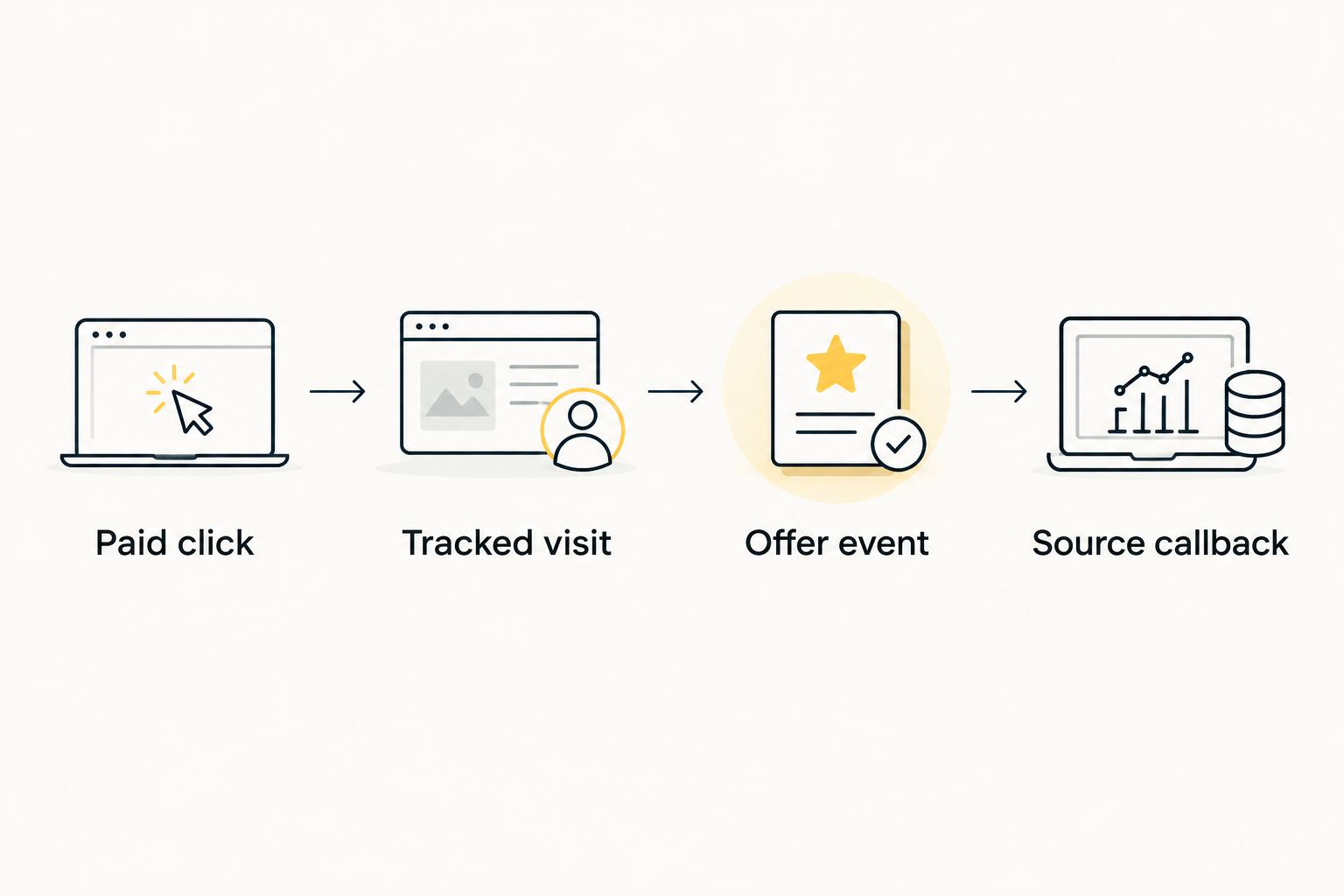
Record the test outcome in your 2026 campaign checklist. Keep the identifiers, event status, and callback response together so a later campaign edit can be checked against a known working configuration.
Send updates when conversion status changes
Use a status-update workflow when your offer distinguishes an initial submission from a later approved outcome. This is useful for lead generation and affiliate offers where the initial event is not the final payable conversion.
- Pass the same Keitaro click identifier back for the related event updates.
- Configure the affiliate network’s callbacks to distinguish the initial and final outcomes using the integration’s supported status mapping.
- Check Keitaro’s treatment of repeated events, transaction identifiers, and status updates before enabling multiple callbacks for the same conversion.
- Choose which outcome triggers the outgoing traffic-source callback. If approval is your optimization target, keep the preliminary event out of that signal.
Best for: Offers with an approval stage. The benefit is a closer match between your conversion signal and your campaign objective; the trade-off is waiting for the upstream approval event.
| Workflow | Best for | Advantage | Trade-off |
|---|---|---|---|
| Initial-event callback | Diagnosing funnel activity | Shows the first reported conversion event | Does not establish that the event became an approved outcome |
| Approved-event callback | Optimizing against accepted conversions | Aligns the signal with the approved result | Arrives only after the offer system reports approval |
In 2026, keep both events available for analysis when the integration supports them, but avoid counting both as independent acquisitions. Review event-handling behavior before assuming a later callback updates an earlier record.
Troubleshooting
The external identifier contains literal macro text
Fix the incoming mapping first. Compare the traffic-source macro with its current documentation, then inspect a click served through the paid campaign. A manually opened destination or unsupported macro can leave the token unexpanded.
Also check that the campaign uses the traffic-source configuration you edited. Changing a separate template does not prove the live campaign inherited that change.
The offer reports a conversion, but Keitaro cannot attribute it
Inspect the identifier passed to the offer and the identifier returned in its callback. Both must refer to the same Keitaro visit. A stripped query parameter, incorrect affiliate sub-ID field, or overwritten identifier breaks this connection.
Follow the actual redirect path. Confirm that intermediate landing pages preserve the tracking parameter when they send the visitor to the offer.
Keitaro records the conversion, but the source does not
Inspect the outgoing callback and confirm it contains the original external click identifier. Then check the endpoint, required authentication, configured event condition, and response from the receiving system.
Do not diagnose this as an incoming-postback failure. Once the conversion attaches to the correct Keitaro click, the remaining checks are the outgoing callback and source-side acceptance.
Conversions appear duplicated
Check whether both a browser-based event and a server callback report the same action. Also inspect retries, repeated test requests, and separate lead and approval events.
Choose a documented deduplication method supported by the receiving system. Do not assume that resending an identical request is harmless, or that different status labels automatically prevent double counting.
The callback is blocked or never reaches the tracker
Check tracker availability, HTTPS configuration, firewall rules, and security challenges. A server-to-server sender cannot complete an interactive browser challenge.
Use request logs to separate an unreachable endpoint from a reachable endpoint receiving invalid parameters. Fix access without removing protection from unrelated tracker routes.
Customize your workflow
Once attribution works, add documented placement and creative identifiers to make conversion reports useful for buying decisions. Segment by GEO and format where those fields are collected, rather than grouping every visit under a campaign total.
Optimize against the event you actually want to buy. Use approved-conversion reporting for an approval-based objective, and keep preliminary events as funnel diagnostics. Conversion tracking identifies reported outcomes; it does not independently prove traffic quality or eliminate ad fraud.
For pop campaigns, apply the measurement setup alongside the traffic-selection approach in the related guides below. Changing a bid, destination, or tracking template should trigger another attribution check, especially when the edit changes URL parameters.
FAQ
How do I connect EZmob to Keitaro for postback tracking?
Preserve the traffic source click identifier in Keitaro, pass Keitaro’s {subid} to the offer, and configure incoming and outgoing postbacks. Test that the offer conversion attaches to the tracked click and that the outgoing callback returns its original external identifier.
What is the difference between {subid} and {external_id} in Keitaro?
{subid} represents Keitaro’s tracker click identifier, while {external_id} references the stored external click identifier. Send the tracker identifier to the offer and use the external identifier when notifying the traffic source.
Does a Keitaro postback integration report conversions instantly?
A postback delivers the event when the sending system reports it; it does not guarantee immediate approval or dashboard updates. Affiliate-network processing and the receiving system’s reporting behavior affect when you see the result.
Can I test postback tracking without a real sale?
Use the affiliate network’s supported conversion-testing procedure when it provides one. The test must return a valid identifier from a tracked visit; an arbitrary identifier does not verify attribution.
Why does Keitaro show a conversion that my traffic source does not?
The incoming callback can work while the outgoing callback fails. Check the stored external identifier, outgoing event condition, endpoint requirements, and receiving system’s response.
Should I send leads or approved sales back to the traffic source?
Send the event that matches your campaign’s optimization objective. If your objective is an approved sale, keep preliminary leads separate rather than counting both as equivalent conversions.
Do I need a browser pixel as well as a server-to-server postback?
A server-to-server postback does not require a browser pixel to deliver that callback. If you also use browser-based conversion reporting, configure deduplication before allowing both methods to report the same action.
One last thing
A successful callback response is not proof of correct attribution. Before scaling a 2026 campaign, inspect the identifier inside the request and the conversion credited to it. Transport, attribution, and event selection are separate checks; passing only the first leaves your optimization signal unverified.
Related guides
- Popunder traffic for affiliate marketers
- Is buying pop traffic profitable for affiliate marketers?
- Ecommerce popunder case study
Start advertising on EZmob after you verify the click-ID mapping and complete the end-to-end conversion test.