
Instead of manually matching EZmob clicks to affiliate conversions, connect the campaign through Voluum and return conversion events with a server-to-server postback. This Voluum conversion tracking setup keeps click attribution separate from conversion reporting, so you can trace an offer result back to the traffic that produced it.
- EZmob suits affiliate media buyers who want self-serve traffic buying with Voluum conversion tracking setup.
- Use server-to-server postbacks for affiliate conversion tracking when your offer provider supports them.
- Preserve both the traffic-source click ID and Voluum’s click ID; they serve different purposes.
- Verify attribution before using CPA reports to change bids or exclude inventory.
Why this matters
A recorded conversion is useful only when it belongs to the correct click. Your traffic source, tracker, and affiliate network each see a different part of the journey. The connection works when the identifiers survive every handoff.
EZmob provides self-serve access to pop, push, display, and native traffic. Voluum handles the tracking layer in this workflow; the offer provider reports the conversion. Connecting those roles does not automatically create bid rules or synchronize campaign settings.
For your 2026 setup, treat conversion tracking and campaign automation as separate jobs. First prove that an actual click produces the correct conversion record. Then decide which reporting or optimization actions to automate.
Before you start
- Accounts and access: Have access to your advertiser account, your Voluum workspace, and the affiliate network or advertiser system that records conversions. You need permission to edit campaign destinations and conversion callbacks.
- Offer materials: Prepare the approved destination, GEO, traffic format, and conversion event definition. Confirm that the offer accepts your chosen traffic and that its system supports a tracking parameter and a server-to-server callback.
- The gotcha: A traffic-source click ID is not the same identifier as a Voluum click ID. Store the former in the traffic-source configuration; pass the latter to the offer provider. Sending the wrong identifier back breaks attribution.
Keep the current traffic-source token instructions beside you during setup. Copy tokens and callback addresses from the relevant account rather than adapting examples from another ad network. Capitalization, braces, and parameter names are part of the integration.
Choose the conversion reporting method
Use a server-to-server postback when your affiliate network supports it. The network sends the conversion to Voluum without requiring a confirmation page to load in the visitor’s browser.
| Method | Best for | Advantage | Limitation |
|---|---|---|---|
| Server-to-server postback | Affiliate offers with network callback support | Reports the event directly from the conversion system | Requires the correct click ID and callback mapping |
| Browser conversion pixel | Owned funnels with an editable confirmation page | Lets you report a browser-visible conversion event | Depends on the page loading and the tracking request succeeding |
| Manual reconciliation | Investigating reporting discrepancies | Lets you compare individual records across systems | Does not replace automatic conversion reporting |
These methods are not interchangeable installation instructions. A browser pixel needs an implementation on the appropriate page; a postback needs configuration in the system that knows the conversion occurred.
For a 2026 affiliate campaign, use the postback path below when the offer provider supports it. If you control the entire funnel, choose the method that matches how your backend confirms the event. Do not install both methods for the same event without a deliberate duplicate-prevention plan.
Traffic-source configuration
Click attribution
- Open Traffic sources in Voluum. Select the relevant existing traffic source or create a traffic-source configuration for this integration.
- Check the traffic-source template against the token instructions in your advertiser account. Do not assume that a template’s presence proves every field matches your campaign.
- Map the traffic source’s click identifier into Voluum’s external click ID parameter. This preserves the identifier needed for any conversion feedback sent back to the source.
- Map the inventory dimensions you need for decisions, using only supported tokens. Useful dimensions include placement, campaign, creative, and GEO when the traffic source exposes them.
- Save the configuration. Inspect the resulting campaign parameters before moving to the offer setup.
Expected result: Voluum has a traffic-source configuration that can retain the source click identifier and your selected reporting dimensions.
A token name appearing in a URL is not proof that the token works. During a real campaign click, supported placeholders should become actual values. A literal placeholder remaining in the recorded data signals a mapping problem.
Do not populate unsupported dimensions with guesses. A clean report containing fewer valid fields is more useful than a detailed report filled with static labels that pretend to identify inventory.
Offer routing
- Open Offers in Voluum and create or select the offer you intend to promote.
- Copy the destination from the affiliate network or advertiser. Preserve its required affiliate parameters.
- Identify the offer provider’s supported sub-ID or tracking parameter. Use that parameter to carry Voluum’s click ID.
- Insert Voluum’s
{clickid}token as the value of that parameter. Do not replace it with the traffic source’s external click ID. - Save the offer and inspect the destination structure. Keep each tracking parameter in the query string, not in a URL fragment after a hash character.
Expected result: When Voluum routes a visitor to the offer, the offer provider receives the Voluum click ID in its designated tracking field.
The name of that field belongs to the offer provider. Do not assume it is called subid, or reuse a parameter name simply because another affiliate network accepts it.
If your flow includes a landing page, configure its offer links according to Voluum’s landing-page tracking instructions. Replacing a tracked offer link with the raw affiliate destination disconnects the handoff you just configured.
Conversion callback configuration
Conversion postback
- Copy the conversion postback address from your Voluum configuration. Use the tracker-generated address for your account rather than typing a tracking domain from memory.
- Open the offer provider’s conversion callback settings. Select the appropriate offer or account scope before editing anything.
- Put the provider’s token for the stored Voluum click ID into the postback’s
cidparameter. - Map the provider’s payout token to the
payoutparameter when you want revenue reporting. Keep the amount and currency conventions consistent across your reports. - Map a transaction identifier to
txidwhen the provider supplies one and your conversion design uses it. Define how separate events and repeated callbacks should be handled before launch. - Save the callback and verify which event triggers it: lead, approved sale, install, or another supported outcome.
Expected result: The conversion system returns the same Voluum click ID that it received during the offer visit, together with the event data you configured.
A callback must contain a real stored click ID, not the literal {clickid} token. Voluum replaces that token on the outbound offer visit. The affiliate network uses its own token syntax to retrieve the stored value for the return request.
For a 2026 reporting baseline, document the event definition beside the campaign. A submitted lead and an approved lead are different outcomes. Comparing their CPAs without naming the event produces a misleading comparison even when the tracking works.
Traffic-source feedback
- Check whether your advertiser account provides a conversion callback address for the campaign.
- If supported, place that address in Voluum’s traffic-source postback configuration.
- Use the external click ID retained during click attribution wherever the traffic source expects its original identifier.
- Map only the conversion fields supported by the receiving system. Do not assume that revenue, transaction IDs, or event labels are accepted.
- Test feedback independently from the affiliate-network-to-Voluum callback.
Expected result: If conversion feedback is supported and correctly configured, the source can associate the returned event with its original click.
You can record conversions in Voluum without completing this return leg. Sending conversions back to a traffic source is a separate integration, not a requirement for the tracker to receive affiliate-network events.
Campaign destination and verification
Campaign routing
- Open Campaigns in Voluum. Create or select the campaign and assign the traffic-source configuration you prepared.
- Select the intended offer route, including the landing page if your flow uses one.
- Copy the generated campaign URL. Put it into the advertiser campaign’s destination setting rather than sending paid traffic directly to the raw offer URL.
- Check that the destination includes the required traffic-source parameters. Preserve their token syntax when saving the advertiser campaign.
- Submit the campaign for creative moderation. New campaigns go through moderation before they go live.
Expected result: An approved campaign routes traffic through Voluum before visitors reach the offer.
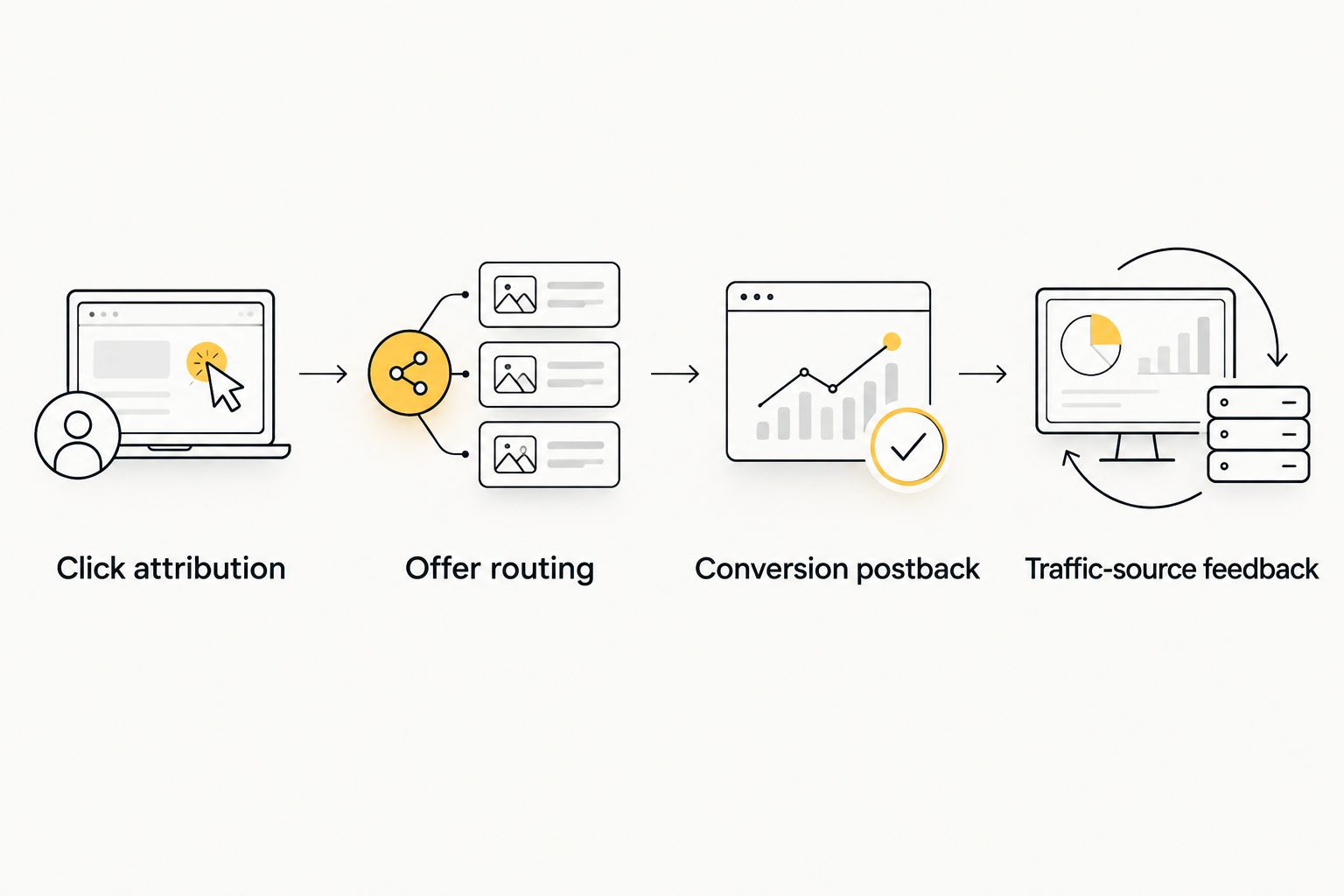
The full path has distinct handoffs: Click attribution, Offer routing, Conversion postback, and Traffic-source feedback. Diagnose each handoff separately instead of treating the connection as a single switch.
Live-path verification
- Arrange a controlled test using a conversion method authorized by the offer provider. Do not generate prohibited self-conversions.
- Open the campaign through a valid traffic-source click when testing source token substitution. Opening the tracker URL directly does not test the source’s macros.
- Find the visit in Voluum and inspect the external click ID and reporting dimensions.
- Confirm that the offer provider received the Voluum click ID in its tracking field.
- Trigger the authorized test conversion and inspect the resulting Voluum record. Match the click ID, event, and reported revenue.
- If you configured source feedback, verify that return request separately.
Expected result: You can trace the recorded conversion from the original source click through the tracker to the offer provider and back.
Keep a compact test record with the campaign name, click identifier, event, and outcome. This becomes your reference when changing a destination or replacing an offer later in 2026.
Track an approved conversion after an initial lead
A second workflow applies when your offer provider reports both an initial event and a later approval. Keep the original click relationship and distinguish the events. Do not create an unrelated click to represent the approval.
- Define whether your main CPA report measures submitted leads or approved leads.
- Configure separate event reporting using the event mechanisms supported by your Voluum setup and offer provider.
- Decide whether revenue belongs on the initial event or the later approval.
- Test repeated callbacks and event identifiers before relying on the reports.
This workflow is best for offers where the first recorded action is not the final billable outcome. Its advantage is clearer attribution across the approval process; its limitation is the additional event mapping and reconciliation required.
A later status change is not automatically a new payable conversion. Match your tracking design to the offer provider’s actual event rules.
Troubleshooting
Clicks appear, but conversions do not
Inspect the offer provider’s stored tracking field first. If it contains no Voluum click ID, correct the outbound offer parameter; if it contains the right value, inspect the callback configuration and delivery record. Changing bids will not repair either failure.
Conversions cannot be matched to a click
Compare the callback’s cid value with the recorded Voluum click ID. A source identifier, static value, or unexpanded token cannot substitute for that tracker identifier. Correct the token mapping at the system sending the callback.
Inventory fields contain placeholder text
Check whether the destination uses supported traffic-source tokens and whether the test came through a real source click. A direct tracker visit does not populate source macros. Fix the destination mapping before evaluating placements.
Conversions are counted more than intended
Look for overlapping pixel and postback reporting, repeated callbacks, or multiple event types included in the same total. Review transaction and event identifiers alongside your duplicate-handling configuration. Do not hide the discrepancy by deleting records without identifying its cause.
CPA reports disagree across systems
Compare timezone, conversion event, reporting period, and revenue conventions. Check whether one report groups results by click time while another groups them by conversion time. Align the definitions before treating the difference as lost traffic or ad fraud.
Customize your workflow
Once attribution works, build reports around decisions: which GEO, creative, or placement deserves more traffic, and which should be excluded. Keep tracking correctness separate from performance judgment. A correctly recorded conversion does not prove that a placement is profitable.
For EZmob popunder campaigns, carry the same discipline into inventory evaluation. The popunder traffic guide for affiliate marketers provides the next campaign-specific reading path.
Before adding automation in 2026, define the action and its evidence requirement. Reporting a conversion, pausing inventory, and changing a bid are different operations; this setup establishes the reporting connection, not an automatic bidding policy.
FAQ
What is the best Voluum conversion tracking setup for affiliate offers?
Use server-to-server postbacks when the offer provider supports them. Pass Voluum’s click ID to the offer, then configure the provider to return that stored identifier in the conversion callback.
Can I track EZmob conversions in Voluum without sending them back to the ad network?
Yes, Voluum can receive the offer provider’s conversion postback independently of traffic-source feedback. The optional return leg uses the original source click ID and needs its own configuration.
Which click ID should my affiliate network return to Voluum?
Return the Voluum click ID received during the offer visit. The traffic-source click ID belongs to the source-feedback leg and is not a substitute for Voluum’s conversion identifier.
Is a server-to-server postback better than a conversion pixel?
A server-to-server postback is the recommended path for affiliate offers with callback support because it does not require a browser confirmation page to load. A pixel fits an owned funnel when you can implement and verify tracking on the relevant page.
Does connecting Voluum automatically optimize my bids?
No, conversion tracking alone does not create bid rules. Establish correct attribution first, then configure any supported campaign automation as a separate workflow.
Why does my callback contain a token instead of a click ID?
The sending system has not substituted the correct stored-value token. Use Voluum’s click token on the outbound offer URL and the offer provider’s own token in the return callback.
How do I verify my conversion tracking before scaling in 2026?
Use an authorized test conversion and trace the identifiers through every handoff. Confirm the source click, Voluum visit, offer-provider tracking field, conversion record, and any optional source feedback.
One last thing
Test a changed offer destination as a tracking change, not just a URL edit. A replacement link can send visitors to the correct page while dropping the parameter that makes every later conversion attributable. Save the working configuration before changing it.
Related guides
Start advertising on EZmob after you have verified the click-to-conversion path.