
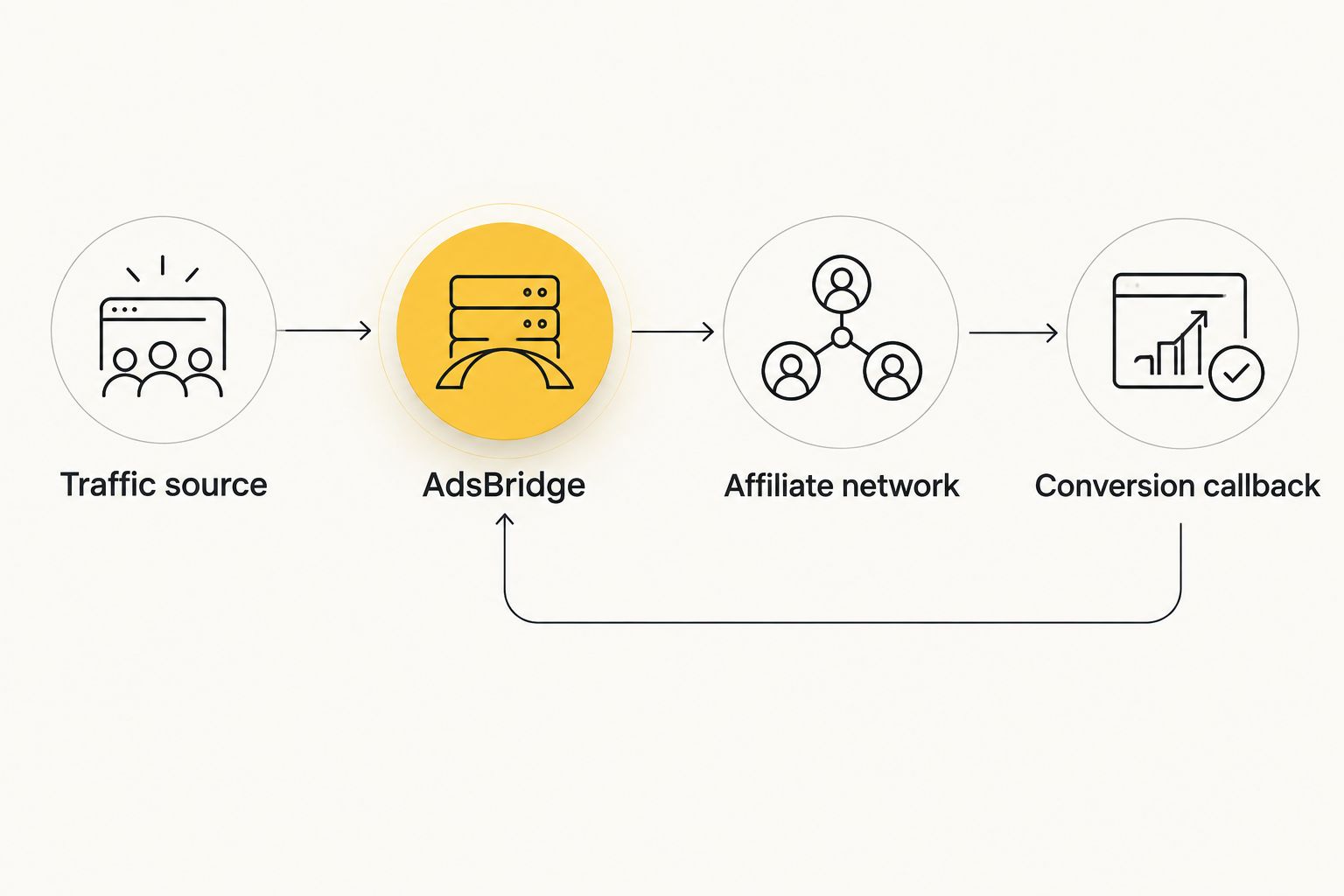
Instead of manually matching traffic reports to affiliate conversions, connect EZmob traffic to an AdsBridge campaign and configure your affiliate network’s server-to-server callback. This adsbridge postback tracking workflow preserves the click ID from the visit through the conversion, so you can attribute outcomes without matching exports by hand.
- Use AdsBridge postback tracking to match affiliate conversions to recorded clicks, not to reconcile reports manually.
- EZmob is best for affiliate media buyers who want self-serve access to pop, push, display, and native traffic.
- Keep the traffic-source click ID separate from the AdsBridge tracking ID throughout the redirect chain.
- Validate an inbound affiliate postback before attempting an outbound traffic-source conversion callback.
Why this matters
A recorded visit and a recorded conversion are different events. AdsBridge needs a shared identifier to connect them; campaign names, GEOs, and timestamps do not replace that identifier.
EZmob is best for affiliate media buyers who want self-serve access to pop, push, display, and native traffic. The trade-off is configuration responsibility: self-serve access does not remove the need to validate your destination, parameter mapping, and conversion callbacks.
This guide separates traffic routing from conversion reporting. If you also maintain another tracker, keep its configuration separate; the Voluum conversion tracking guide covers that adjacent workflow.
For your 2026 setup, copy endpoint addresses and replacement tokens from the current account configuration or official integration instructions. Do not reconstruct them from an example written for another tracker.
Before you start
- Accounts and access: Have advertiser access to EZmob, campaign-editing access to AdsBridge, and permission to configure tracking parameters and conversion callbacks for your affiliate offer.
- Materials: Have the offer destination, the AdsBridge-generated campaign URL and inbound postback URL, and the documented traffic-source replacement tokens. For any return callback, obtain the actual conversion endpoint and supported parameters first.
- The gotcha: A traffic-source click ID and an AdsBridge tracking ID identify different records. Save the source ID with the visit, but send the tracker ID to the affiliate network for conversion attribution.
Choose an offer whose conversion event you can test through an authorized method. A campaign that records visits but has no testable conversion path leaves half the setup unverified.
New campaigns go through creative moderation before they go live. Treat moderation and tracking validation as separate checks: approval does not prove that the callback works.
Traffic-source mapping
Start by defining what enters the tracker. The destination URL carries the visit into AdsBridge; its parameters carry the information you want associated with that visit.
Configure the source and destination
- Create or select the AdsBridge traffic-source configuration for EZmob. Use a current supported template when one is provided; otherwise map parameters against the source’s documented tokens.
- Identify the source click-ID token. Map its resolved value into the tracker’s supported external or source-click identifier field, using the field specified in the current integration instructions.
- Map any additional documented parameters you need, such as campaign or placement identifiers. Add only tokens the source actually supplies.
- Configure the affiliate offer destination and the campaign routing in AdsBridge. Generate the campaign URL from the tracker rather than manually assembling a tracking address.
- Use that generated campaign URL as the advertising destination. Preserve its query parameters when copying it into your campaign configuration.
Expected result: A visit through the advertising destination appears in AdsBridge, and the source identifier is stored as an actual value rather than an unresolved token.
Do not confuse a parameter’s name with its value. The name tells AdsBridge where to store information; the token tells the traffic source which information to insert.
For a 2026 campaign handoff, record the parameter name, the documented token, and a resolved test value. That small mapping record makes later troubleshooting faster than comparing entire URLs character by character.
Check the visit before configuring conversions
Inspect a recorded visit and confirm that it reached the intended offer. Then inspect the source identifier associated with that visit.
An empty identifier means the mapping failed. A token displayed literally means substitution failed. Neither problem is fixed by adding a conversion callback downstream.
Use an authorized test route that exercises the real redirect chain. Simply opening a campaign URL without source parameters proves that the tracker can receive a visit, not that the traffic-source mapping works.
Affiliate conversion callback
The affiliate network must receive an AdsBridge tracking ID with the visit and return that same ID when the conversion happens. This is the attribution link that connects the offer event to the tracker record.
Pass the tracker ID to the offer
- Identify the affiliate network’s documented sub-ID or tracking parameter. Confirm which parameter is returned in its conversion callback.
- Insert the AdsBridge tracking-ID replacement token into that offer parameter. Copy the token exactly from the tracker’s current instructions.
- Preserve any existing offer parameters required for attribution or routing. Check how the destination handles its existing query string before appending another parameter.
- Follow an authorized test visit through the redirect chain. Inspect the resulting offer request or the network’s click record to confirm that the tracking parameter contains a resolved value.
Expected result: The affiliate network receives the tracker ID associated with the visit, not the traffic-source ID and not the literal replacement token.
Do not substitute a campaign ID for a click-level tracking ID. A campaign groups visits; it does not identify the individual visit responsible for a conversion.
Configure the inbound postback
- Copy the inbound conversion postback URL generated or documented by AdsBridge for your setup.
- In the affiliate network’s conversion callback configuration, supply that URL with the network’s documented replacement token for the stored tracker ID.
- Map the conversion event and revenue only where the receiving endpoint and sending network support those parameters. Keep the event definition explicit: a submitted lead and an approved sale are not interchangeable.
- Use the network’s authorized callback test or an authorized test conversion. Compare the returned identifier with the recorded AdsBridge visit.
- Inspect the conversion record and the callback delivery response. Confirm attribution, event meaning, and any revenue value separately.
Expected result: AdsBridge records the intended conversion against the original visit. A successful HTTP response alone does not establish correct attribution.
This is the core adsbridge postback tracking connection. The affiliate network sends the conversion to the tracker; the browser does not need to revisit the landing page to deliver that server-to-server message.
The workflow has 2 distinct IDs: the source click ID and the tracker ID. It also has 2 separate checks: recording the visit and matching the conversion.
Optional traffic-source callback
Tracking affiliate conversions in AdsBridge and reporting those conversions back to the traffic source are separate workflows. Do not assume that completing the inbound postback completes the return path.
For an EZmob return callback, first obtain a documented conversion endpoint and its required parameters for your account. Configure this path only against those instructions; an endpoint copied from another ad network is not a substitute.
Configure the return path
- Confirm the receiving endpoint’s accepted identifier, event fields, authentication requirements, and supported request method.
- Configure the tracker’s supported outbound traffic-source callback using the source click ID saved with the original visit.
- Select the intended conversion event where event selection is supported. Avoid forwarding every status change as a new acquisition.
- Send an authorized test and inspect the delivery result. Check the receiving conversion report separately from the tracker report.
Expected result: The receiving traffic-source system associates the callback with the original source click. The tracker’s inbound conversion remains a separate record with its own attribution check.
If your setup has no documented return endpoint, keep conversion measurement in AdsBridge. Do not invent a callback address or assume a browser destination can receive server-to-server conversion events.
Variant: report an approved conversion
An initial conversion and its later approval can represent different stages of the same acquisition. Use an approval-based workflow when the affiliate network exposes that event and the tracker supports the required handling.
This is useful when a submitted lead is not the outcome you optimize against. The limitation is delayed feedback: an approval event arrives after the initial submission, and its timing depends on the offer’s process.
| Workflow | Best for | Benefit | Limitation |
|---|---|---|---|
| Initial conversion callback | Checking immediate lead or sale attribution | Confirms the initial event’s connection to a visit | Does not establish later approval |
| Approval callback | Measuring accepted outcomes | Aligns reporting with the selected approval event | Requires supported event handling and later feedback |
Before adopting either workflow in 2026, define what counts as a conversion in each report. If the affiliate network counts approved leads while the tracker counts submissions, totals differ even when the technical connection works.
Configure the approval variant as follows:
- Confirm the network exposes an approval event rather than only an initial conversion notification.
- Check the tracker’s documented behavior for that event: update, separate event, or duplicate rejection.
- Preserve the original visit identifier and any supported transaction identifier across the event lifecycle.
- Test submission and approval through the authorized testing method. Confirm that the final report reflects your intended event definition.
Expected result: Approval is handled deliberately, without silently turning the same acquisition into an extra conversion.
Troubleshooting
Visits appear, but conversions do not
Check the offer-side tracking parameter first. The network must receive a resolved tracker ID and return it through the inbound postback.
Then inspect the callback delivery log and endpoint response. Correct the identifier mapping before changing bids, targeting, or creatives; those settings do not repair attribution.
The callback arrives, but no visit matches
Compare the returned ID with the original AdsBridge visit. Look for the source click ID being returned in place of the tracker ID, a missing parameter, or an identifier altered during a redirect.
Trace the full value through each handoff. The visible beginning of an ID is not enough to prove that the entire identifier survived.
Tokens appear literally in the destination
A literal token means the sender did not replace it. Check token syntax, the configuration field containing it, and whether that field supports substitution.
Use the sender’s documented token rather than a token from the receiving system. A network callback needs the network’s replacement syntax, even when the value originated in AdsBridge.
Conversion totals differ between reports
Align the event definitions, reporting periods, time zones, and filters. Compare the same conversion event before treating the difference as a delivery failure.
Inspect repeated notifications as well. Verify the receiving system’s documented duplicate handling before retrying callbacks or changing transaction identifiers.
Tracker conversions appear, but source conversions do not
Check the return path separately: saved source click ID, supported outbound callback configuration, receiving endpoint, and delivery response.
An inbound affiliate conversion proves only that the affiliate-to-tracker path worked. It does not prove that the tracker-to-source callback was configured or accepted.
Customize your workflow
Once attribution works, add reporting detail selectively. Campaign, placement, GEO, and creative parameters are useful only when their source values are documented and arrive intact.
Keep the original click-ID mapping unchanged while adding reporting dimensions. Change a parameter, test its resolved value, and check that the existing conversion still matches its visit before expanding the setup further.
For your 2026 tracking record, retain these 3 checkpoints:
- Visit recorded: The tracker receives the traffic and stores the source identifier.
- Conversion matched: The affiliate callback returns the correct tracker identifier.
- Return confirmed: Any configured traffic-source callback receives and attributes the event.
Treat conversion tracking and ad fraud checks as separate jobs. A functioning callback establishes an attribution connection; it does not certify traffic quality or prove that an offer is profitable.
Use the resulting reports to compare outcomes for the event you actually chose. Do not change the conversion definition halfway through a campaign comparison without marking that change.
FAQ
How do I connect EZmob to AdsBridge for postback tracking?
Route advertising visits through an AdsBridge campaign URL, pass the AdsBridge tracking ID to the affiliate offer, and configure the affiliate network to return that ID to the tracker’s inbound postback. Any callback back to the traffic source requires a separately documented endpoint and mapping.
Which click ID should my affiliate network send back?
The affiliate network should return the AdsBridge tracking ID that it received with the original visit. Keep the traffic-source click ID separate for any supported return callback to the source.
Can I copy a postback URL from another tracker?
No. Use the inbound endpoint and replacement tokens documented for your AdsBridge setup, then use the affiliate network’s syntax to populate the callback values.
Does a successful callback response prove tracking works?
No. Confirm that the conversion appears against the intended visit and carries the correct event meaning. A successful delivery response does not by itself prove attribution.
Can I track approved leads instead of submitted leads?
Use approval-based tracking when the affiliate network exposes the approval event and the tracker supports its handling. Test whether the event updates an existing record or creates a separate event before using it for reporting.
Why do my conversion reports disagree in 2026?
Compare event definitions, reporting periods, time zones, filters, and callback delivery records first. A report counting submissions will not match a report counting approvals simply because both use the word conversion.
One last thing
Keep the callback response and the matched visit record together when documenting a successful test. The response proves delivery; the matched record proves attribution. You need both before treating a tracking connection as complete.
Related guides
- Keitaro postback tracking setup
- Popunder traffic for affiliate marketers
- Ecommerce popunder campaign case study
Start advertising on EZmob after you validate the destination and conversion callback.