
Instead of manually matching ad spend to affiliate conversions, connect EZmob traffic to a RedTrack campaign URL, pass the tracking identifier into your offer, and return conversions through the generated postback. This RedTrack campaign tracking integration guide covers the click path, conversion feedback, and checks you need before using the reports to change bids.
- EZmob self-serve advertising suits media buyers who want to launch pop, push, display, and native campaigns themselves.
- A RedTrack campaign tracking integration needs a working campaign URL, preserved click identifiers, and validated conversion tracking.
- Keep the tracker click identifier separate from the traffic-source identifier when configuring server-to-server postbacks.
- Validate attribution before optimizing CPA; conversion tracking does not automatically establish accurate campaign costs.
Why this matters
A conversion total is not enough to decide which inventory deserves your next bid. You need the conversion attached to the campaign and source information captured when the visitor arrived. Otherwise, profitable and unprofitable traffic end up in the same report.
EZmob self-serve advertising is best for media buyers who want to launch pop, push, display, and native campaigns themselves. The benefit is control over campaign setup; the responsibility is validating the tracking path before treating its reports as buying signals.
For your 2026 setup, distinguish event tracking from cost reporting. A working conversion postback proves that a conversion reached the tracker, not that spend, revenue, and attribution are all correct. The same separation applies in the related Voluum conversion-tracking guide, but use RedTrack's own generated configuration for this workflow.
Before you start
- Have advertiser access to EZmob and permission to configure campaigns in RedTrack. Prepare your destination, approved offer materials, and access to the affiliate network or conversion system that will send the postback. New advertising campaigns go through creative moderation before going live.
- Confirm that your offer accepts a tracking identifier and that its conversion system can return that same value. Also confirm that your landing page, if used, preserves tracking parameters when visitors continue to the offer.
- Separate the tracker click identifier from the traffic-source click identifier. The tracker needs its own identifier to attribute the conversion; a postback sent back to the ad network needs the source identifier. Substituting one for the other breaks the return path.
Use the configuration supplied by your active accounts in 2026, including supported macros, parameter names, and generated endpoints. Copy those values rather than typing syntax from memory. Treat a traffic-source template as a starting configuration that still needs a live test.
Traffic-source configuration
The traffic-source configuration tells RedTrack which information an incoming advertising click carries. Start with attribution, not automatic bidding or cost synchronization. Keep this first setup narrow enough that you can inspect every value passed through it.
- Create or select the traffic-source configuration for your advertiser account. If an applicable template exists, inspect its parameter mappings before using it; otherwise, configure the source using the macros documented in the advertiser account.
- Map the source click identifier separately from campaign and placement identifiers. Add only identifiers that the traffic source actually supplies, using the tracker configuration's designated fields or supported custom parameters.
- Decide how campaign cost will enter the report. Use a supported cost connection or documented cost parameter where available; otherwise, reconcile spend separately. Do not enable an assumed automatic cost connection simply because conversion tracking works.
Expected result: the traffic-source configuration identifies the origin of the visit without confusing source identifiers, tracker identifiers, or cost values.
A useful naming convention distinguishes format, offer, and GEO. Keep those names consistent between the buying account and tracker so you can match reports without relying on memory. Naming helps reconciliation, but it does not replace passing identifiers through the URL.
Offer and postback configuration
The offer configuration connects the tracked visit to the conversion system. The critical handoff is the tracker click identifier: it must reach the offer and come back unchanged with the conversion. A campaign name is not a substitute.
- Add the actual offer destination to the tracker configuration. Identify the offer's documented parameter for accepting a tracking value, then insert the tracker-generated click identifier using RedTrack's supported substitution syntax.
- Generate the conversion postback from the tracker configuration. Put it into the affiliate network or conversion system that records the completed action, replacing the relevant identifier placeholder with that system's documented return token.
- Configure revenue and event information only when the conversion system supplies those values. Check the expected currency and event meaning before mapping them. Do not label every returned event as an approved, payable conversion.
Expected result: the conversion system stores the tracker identifier received with the visit and returns it to the correct tracker endpoint when the configured event occurs.
The tracker click identifier must survive the entire offer journey. Check this handoff before adjusting campaign targeting. A visitor reaching the right page does not prove that the identifier arrived with the visit.
For a 2026 implementation, retain a configuration record containing the parameter mapping, event definition, and currency convention. Exclude credentials and personal visitor data. This record makes later troubleshooting possible without reconstructing the original setup.
Campaign URL and destination configuration
Choose the destination path according to how the offer works, not according to which setup looks shorter. A landing page adds a handoff to inspect; direct-to-offer routing removes that handoff but also removes your pre-offer page.
| Destination workflow | Best for | Advantage | Limitation |
|---|---|---|---|
| Landing-page routing | Offers needing explanation before the offer | Lets you control the pre-offer message | The onward link must preserve the tracking identifier |
| Direct-to-offer routing | Offers suitable for an immediate destination visit | Removes the landing-page handoff | Gives you no separate pre-offer page to explain the offer |
- Create the RedTrack campaign using the configured traffic source and offer. Add the landing-page route if your workflow requires it, and verify that its onward destination uses the tracker's supported tracking method.
- Copy the generated campaign tracking URL into the advertiser campaign's destination configuration. Keep the supplied parameter syntax intact. Do not replace it with the final offer URL, which would bypass the configured tracking entry point.
- Inspect the saved destination and the complete redirect path. Confirm that the eventual landing page or offer is correct and that required parameters remain present at each relevant handoff.
Expected result: an advertising visit enters the tracker campaign before reaching the intended destination, with the configured source information attached.
The basic sequence is Traffic source, Tracker campaign, Offer destination, and Conversion postback. Each part has a distinct job: originate the visit, record its identity, receive the visitor, and return the conversion event.
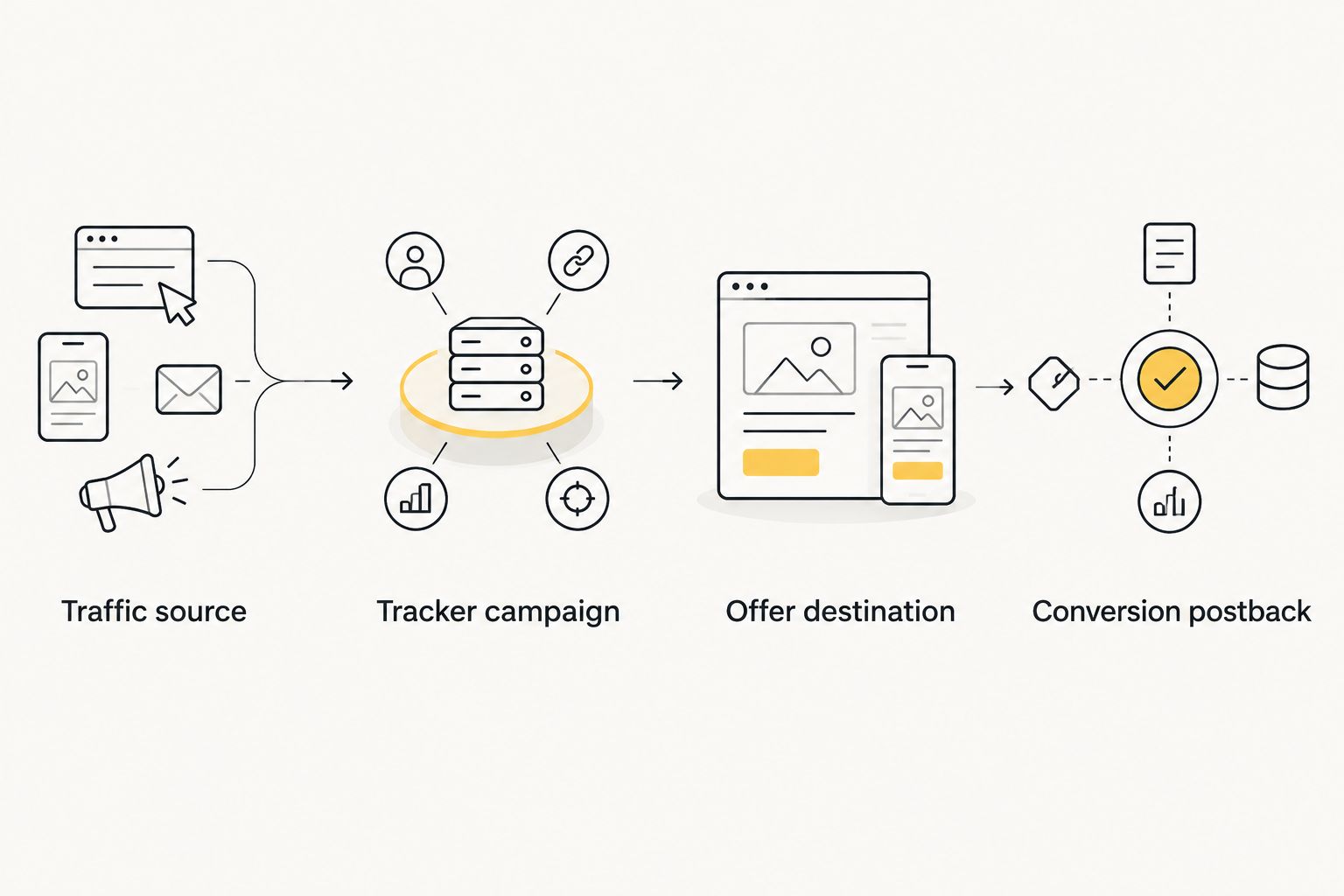
Do not use a copied tracking URL from a different campaign as a shortcut. Even when the destination matches, the campaign association and source mappings can differ. Generate the URL from the configuration you intend to measure.
Validation and reporting configuration
A visible destination page is only the first validation check. You also need evidence that the tracker recorded the visit and associated the returned event with that visit. Complete this check before using CPA to exclude inventory.
- Send a permitted test visit through the exact campaign destination you saved. Inspect the recorded visit for campaign association, the tracker identifier, and supported source parameters. A manually opened URL checks routing, but not necessarily expansion of advertising macros.
- Use the offer system's permitted test procedure to send a conversion. Confirm that the returned identifier matches the recorded visit and that the event appears under the intended campaign. Keep test activity separate from production performance analysis.
- Reconcile spend, event totals, revenue, timezone, and currency across the relevant systems. Confirm what each report counts before comparing it: a submitted event, an approved conversion, and a paid conversion are different reporting definitions.
Expected result: you can trace a permitted test from its source visit to its recorded conversion and explain the associated cost and revenue values.
For your 2026 launch, define what real-time reporting means operationally: an event should appear after the conversion system sends it and the tracker processes it. Real-time tracking is not a guarantee of instant conversion approval. Do not diagnose a missing approved conversion before confirming that the offer system actually sent the event.
Send conversions back to the traffic source
An adjacent workflow sends attributed conversions from RedTrack back to the advertising account. This is separate from receiving conversions in RedTrack, and it requires a supported conversion endpoint on the traffic-source side.
- Obtain the conversion endpoint and accepted parameters from the advertiser account's current tracking instructions.
- Configure the tracker to return the original traffic-source click identifier, not its own click identifier, using the supported outgoing postback configuration.
- Choose the event that should trigger the return postback. Use a clearly defined event rather than sending every stage of the offer funnel as the same conversion.
- Test the return path and check that the advertiser account associates the event with the correct campaign or visit.
Expected result: the advertiser account receives the intended event with an identifier it recognizes, where that tracking connection is supported.
Receiving conversions in the buying account does not establish automatic optimization. Treat event reporting, cost synchronization, and automated bid changes as separate capabilities, each requiring its own configuration and verification.
If you change the offer's event definition later, review both postback directions. A new event can produce correct tracker records while making the advertising account's conversion totals incomparable with earlier results.
Troubleshooting
Visits appear, but conversions do not
Inspect the identifier received by the offer and the identifier returned in the postback. They must match the tracker visit you are investigating. Check whether the conversion system sent the event at all before rebuilding the campaign.
If the identifier is missing, repair the offer parameter or landing-page handoff. If it is present, inspect the conversion system's postback delivery record and the tracker response using the diagnostics available in those accounts.
Placement values contain literal macro text
A source macro that remains unchanged has not supplied a usable placement value. Check its spelling, the format's supported macros, and whether the visit came from the actual advertising delivery path rather than a manually opened URL.
Replace unsupported parameters with documented ones. Do not rename literal macro text into a placement label and then use it to make inventory decisions.
The offer loads, but the click identifier disappears
Inspect the landing-page onward link and intermediate redirects. A redirect that drops the relevant query parameter can preserve the visible destination while breaking attribution.
Repair the handoff that loses the value, then repeat the permitted test. Adding a conversion pixel elsewhere does not repair a missing identifier in a server-to-server return path.
Conversion totals differ between reports
Compare event definitions, timezone, approval status, and reporting windows first. Then inspect whether repeated notifications refer to the same conversion and whether the systems' supported duplicate-handling configuration matches your event model.
Do not assume the larger total is correct. Reconcile identifiable events before excluding traffic or changing bids.
CPA is wrong even though attribution works
Check whether cost is present, current, and assigned to the correct campaign. Also inspect currency and revenue mappings. Correct conversion attribution cannot repair an unrelated spend import or a currency mismatch.
Hold cost-based optimization until the cost calculation is reconciled. You can validate the conversion path independently while correcting the financial reporting.
Customize your workflow
Once the basic path works, expand reporting around decisions you can actually make. Capture supported placement identifiers for inventory analysis, separate meaningful funnel events, and keep format and GEO labels consistent. Add dimensions deliberately rather than collecting parameters without a buying use.
For EZmob campaigns, compare performance within a consistent format, GEO, and event definition before changing bids. Pop and push represent different delivery formats; combining them into a single undifferentiated report hides which campaign configuration produced the result.
Your 2026 workflow should also include a change log. Record destination changes, parameter edits, event-definition changes, and cost-connection changes alongside campaign edits. When reporting shifts, that history helps distinguish a traffic result from a tracking change.
FAQ
How do I connect EZmob to RedTrack for campaign tracking?
Configure the traffic source and offer in RedTrack, use the generated campaign URL as the advertising destination, and return conversions through the generated postback. Validate the click identifier and conversion association before using the reports to optimize campaigns.
Does RedTrack campaign tracking integration mean conversions appear instantly?
No. Events reach the tracker after the conversion system sends them and the tracker processes them. Approval delays and event-delivery timing remain separate from campaign tracking.
Which click identifier belongs in the affiliate network postback?
Return the RedTrack click identifier that was passed into the offer. Keep the original traffic-source identifier separate for a supported outgoing postback to the advertising account.
Can I use a landing page with this tracking setup?
Yes, provided the landing-page route uses the tracker’s supported method and preserves the required identifier on the onward journey. Test the complete path through the landing page, not just the final offer destination.
Will conversion tracking automatically import campaign spend?
No. Configure and verify a supported cost connection or reconcile spend separately. Accurate conversion attribution does not prove that the report’s cost or CPA is accurate.
Why does my tracker show clicks but no conversions?
Check whether the offer received the tracker identifier and whether its conversion system returned that same value. Then inspect event delivery and the tracker response before changing the advertising campaign.
Can I send tracked conversions back to the advertising account?
Yes, where the advertising account provides a supported conversion endpoint. Configure the outgoing postback with the original traffic-source identifier and validate the chosen event independently from the incoming conversion postback.
One last thing
A successful page load can hide a broken tracking setup. The destination can look right while the identifier needed for attribution has already disappeared. Save a permitted, traceable test record before your 2026 launch so later configuration changes have a known working reference.
Related guides
- Keitaro postback tracking setup
- Popunder traffic for affiliate marketers
- Ecommerce popunder campaign case studies
Ready to launch with a validated tracking path? Start advertising on EZmob.