
Content publishers’ native advertising is paid placement styled to fit surrounding content, with the aim of earning revenue from editorial traffic. Start with clearly labeled units and a controlled placement test: your readers need to distinguish paid recommendations from journalism, reviews, and genuine related articles.
- Native advertising for publishers needs clear disclosures, relevant placements, and revenue measurement beyond clicks.
- EZmob fits publishers seeking native alongside pop, push, and display monetization.
- Compare native ad networks with direct sponsorships before committing editorial or technical resources.
- Start with a controlled test; expand only after checking revenue, page performance, and reader behavior.
Why native advertising matters for content publishers
Content publishers sell access to readers who arrived for an article, not an advertisement. Native units place paid recommendations within that reading experience, so placement and disclosure belong in the monetization decision—not in a cleanup task after launch.
For your 2026 plan, separate two jobs: earning revenue from existing visits and protecting the reasons readers return. An ad that attracts clicks but distracts from the article is not automatically a successful placement.
Start your provider research with the native ad network guide, then evaluate the actual publisher terms and implementation requirements. A network comparison helps you build a shortlist; your own page-level test determines whether a placement belongs on your site.
Judge native advertising by its contribution to the publishing business, not by how closely it resembles editorial content. Clear labeling, usable pages, and measurable revenue form the decision criteria.
Set up native monetization without sacrificing the article
Map your inventory
Before contacting a network, use your existing analytics and a simple spreadsheet to map the pages available for monetization. Separate article pages, category pages, and landing pages: each gives the reader a different reason to visit.
Record device, GEO, traffic source, and content topic alongside pageviews. A returning newsletter reader and a first-time visitor from search do not necessarily encounter the same placement or read the same amount of content.
Your 2026 inventory plan should identify where advertising fits without blocking the headline, article opening, navigation, or essential instructions. Do not treat every available gap as an ad opportunity. Record any existing display units too, so the native test accounts for the whole page.
- Group inventory by page template and content topic.
- Separate mobile and desktop observations.
- Record the GEOs and acquisition sources already present in analytics.
- Mark existing ads, newsletter prompts, and subscription prompts.
- Exclude pages where a paid recommendation would confuse the main task.
Define your baseline
Use your existing analytics, advertising reports, and browser checks before adding another monetization partner. Establish what the selected pages already earn and how readers use them.
Keep denominators consistent. Impression eCPM expresses revenue per 1,000 ad impressions; page RPM expresses revenue per 1,000 pageviews. These are different measures, and comparing them directly produces a false winner. Confirm each provider’s reporting definition before combining exports.
For your 2026 measurement plan, distinguish delivery from viewability. The Media Rating Council’s baseline for a qualifying display impression requires at least 50% of the ad’s pixels to be visible for at least 1 continuous second. That display standard is not a blanket definition for every native or video format.
- Record revenue and pageviews for the selected inventory.
- Note whether reports use served impressions or viewable impressions.
- Keep mobile and desktop results separate.
- Document page-loading behavior before installation.
- Identify the reader actions you need to protect, such as subscriptions.
Choose your route
The manual route is direct sponsorship: find an advertiser, agree on the placement, prepare the disclosure, and handle reporting yourself. This gives you control over the commercial relationship, but it also creates sales, production, and approval work.
A network-based route connects publisher inventory with advertising demand without making each placement a separate sponsorship sale. EZmob offers publishers native, pop, push, and display monetization through its advertising network. Assess native on its own before adding other formats; an overall revenue increase does not identify which format caused it.
EZmob fits publishers seeking native alongside pop, push, and display monetization. That format choice is useful, but it does not establish the revenue your particular audience will generate. Provider selection still requires a review of terms, implementation, and available controls.
- Choose direct sponsorship when editorial production is part of the offer.
- Choose network monetization when you want to evaluate ad placements.
- Check accepted content, traffic requirements, and payment terms.
- Ask which placement, category, and reporting controls are available.
- Confirm how to remove the integration before installing it.
Label your placements
Review a mock placement before publishing it. The manual check is straightforward: look at the page as a reader, identify the paid unit, and confirm that its disclosure appears before interaction rather than only after a click.
Apply the Federal Trade Commission’s native advertising guidance: commercial content must be identifiable as advertising. Labels such as Advertisement or Paid Advertisement are clearer than language that leaves the commercial relationship uncertain. Matching the surrounding card style does not justify disguising the source.
For a 2026 launch, review the live mobile page as well as the desktop template. Labels that look obvious on a wide screen can become separated from their cards when the layout changes. Check article pages with long headlines and different content lengths, not just the cleanest example.
- Place the disclosure next to the paid content it identifies.
- Keep ad cards distinct from editorial related-article links.
- Check text contrast and label visibility on mobile.
- Inspect destination headlines and imagery for misleading presentation.
- Assign someone responsibility for reviewing problematic creatives.
Test your placements
Begin with a limited set of comparable pages and keep a record of every change. You can manage the test manually with a spreadsheet; the important part is isolating the variable, not buying another reporting tool.
Compare the native placement against a documented baseline or a contemporaneous control where your setup allows it. Keep unrelated changes out of the test. Rewriting article introductions, moving newsletter forms, and adding ads at the same time makes the result difficult to interpret.
Test placement position before multiplying units. An end-of-article unit and an in-article unit occupy different moments in the reader’s visit. There is no universal winner: your decision depends on measured revenue, reader behavior, and page performance on the tested inventory.
- Record the pages, devices, GEOs, and dates included in the test.
- Change placement position separately from creative presentation.
- Inspect loading, scrolling, and navigation on actual devices.
- Compare total page revenue, not native revenue alone.
- Define a rollback condition for broken layouts or misleading ads.
Review your results
Export the reports and reconcile them with your analytics before expanding. Check whether the network and your analytics use the same time zone, date range, and impression definition. Differences in reporting scope belong in the interpretation, not in a fabricated adjustment.
Break results down by page type, device, and GEO where reporting permits. A positive sitewide average can conceal a weak mobile placement or a content category that earns little while carrying the same page clutter.
Make the 2026 rollout decision explicit: expand a placement that contributes revenue without compromising your chosen reader and performance measures; revise or remove one that fails those criteria. Keep checking after expansion because the pages and traffic mix included in the rollout differ from a limited test.
- Reconcile reporting periods and measurement definitions.
- Compare total revenue per pageview with the baseline.
- Review mobile results independently from desktop.
- Check subscription and other important reader actions.
- Keep, reposition, or remove placements based on recorded results.
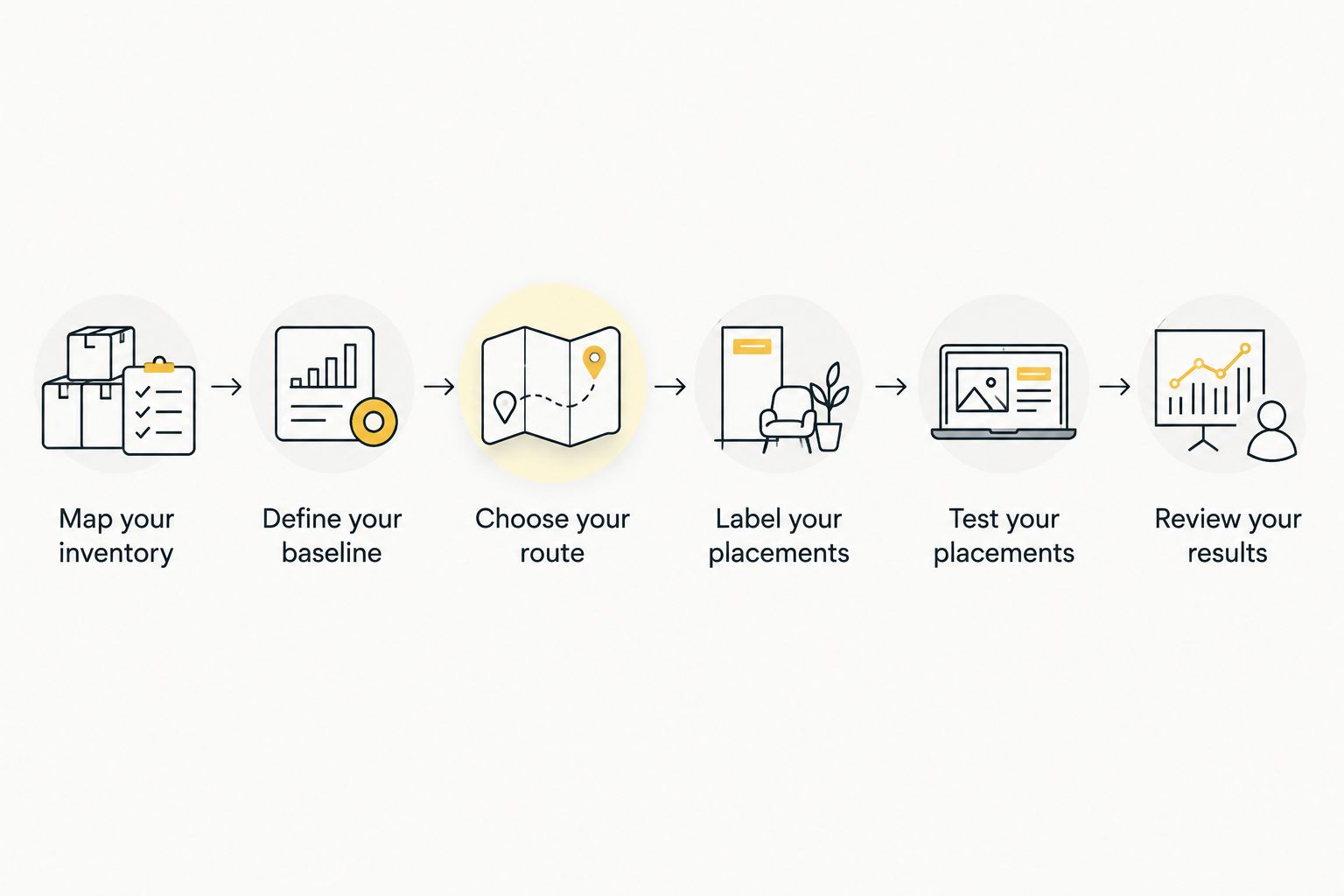
The process is sequential: understand the inventory, establish a baseline, select a route, label the placement, test it, and review the outcome. Skipping the baseline leaves you unable to distinguish a monetization gain from a change in traffic.
Compare publisher monetization options
Compare the work involved as well as the format. Direct sponsorship and network-served native advertising can both appear alongside editorial content, but they require different sales and production processes.
For publishers considering multiple formats in 2026, keep each option’s contribution visible. Native, display, and popunder should not become a single reporting bucket that hides a disruptive placement behind another format’s revenue.
| Option | Best for | Main advantage | Key limitation |
|---|---|---|---|
| Direct sponsored content | Publishers with advertiser relationships and editorial production capacity | Control over the sponsorship brief and commercial relationship | Requires sales, production, disclosure, and approval work |
| Network-served native advertising | Publishers testing paid recommendations within content pages | Lets you evaluate native placements without selling each sponsorship directly | Requires ongoing review of creatives, implementation, and results |
| EZmob publisher monetization | Publishers considering native alongside pop, push, and display | Access to those monetization formats through the same network | Format access alone does not establish performance for your audience |
| Display advertising | Publishers with clearly defined banner inventory | Keeps a distinct advertising area within the page layout | Adds another placement competing for reader attention and page resources |
Choose the operating model you can manage, then test the placement. A direct sponsorship requires commercial and editorial coordination. A network integration requires technical checks and ongoing ad-quality review; it is not a reason to stop monitoring the page.
Common mistakes content publishers make
Blending paid cards into editorial recommendations
A related-articles module recommends your content; a native ad promotes paid content or an advertiser’s destination. Making them indistinguishable removes information readers need to understand the recommendation.
Keep the disclosure attached to the paid placement. Review the live template after installation, including responsive layouts and any lazy-loaded units.
Selecting a network from a headline revenue claim
A rate without its GEO, device, format, reporting period, and denominator is not a useful forecast for your publication. Even a real campaign result describes the inventory measured, not every publisher that joins later.
Evaluate terms and implementation first. Use your own controlled test to decide whether the placement earns its space.
Counting native revenue without checking displaced revenue
A native unit can occupy space previously used by a display ad, newsletter form, or subscription prompt. Reporting only the new unit’s revenue leaves the displacement out of the decision.
Compare the page as a whole. Keep advertising revenue and important reader actions visible alongside the native report.
Expanding across every article template immediately
A tutorial, a news brief, and a long review do not have identical reading flows. Applying the same placement everywhere without checking the rendered pages creates avoidable implementation problems.
Expand by template after reviewing the test. Check disclosure, scrolling, navigation, and existing monetization elements on each template before treating it as approved inventory.
FAQ
What is native advertising for publishers?
Native advertising for publishers is paid placement styled to fit the surrounding content or page layout. Publishers earn from the advertising arrangement while clearly identifying the placement as paid rather than editorial.
Is native advertising better than display advertising for a content site?
Neither format is automatically better for a content site. Compare total page revenue, implementation quality, and reader behavior on your own inventory rather than choosing from the format name.
Can I use EZmob to monetize publisher traffic?
EZmob offers publisher monetization through native, pop, push, and display formats. Evaluate the publisher terms and implementation requirements, then test native separately before combining formats.
Where should I place native ads on an article page?
Place native ads where they remain identifiable and do not block the reader’s main task. Test positions such as the end of an article against your baseline instead of assuming the same location works across every template.
Do native ads need an advertising label?
Yes, native advertising must be identifiable as advertising. Keep a clear disclosure next to the paid content and check that it remains visible in the mobile layout.
What should I measure before expanding native ads?
Measure total page revenue, pageviews, loading behavior, and the reader actions important to your publication. Compare consistent reporting periods and distinguish revenue per ad impression from revenue per pageview.
Can publishers combine native ads with other ad formats?
Publishers can combine native advertising with other formats, but each placement needs its own evaluation. Review the whole page so added units do not obscure the article or make paid content difficult to identify.
One last thing
Check the neighboring editorial module before approving a native placement. A clear ad label does not fix a page where paid cards and genuine article recommendations share an ambiguous container. Inspect both together on mobile, then approve the template—not just the ad unit.
Related guides
- Publisher ad networks for website monetization
- Display advertising networks for publishers
- Publisher alternatives to PropellerAds
Monetize your traffic with EZmob
Explore native, pop, push, and display monetization for your publisher traffic.