
App developers’ push notification advertising is paid acquisition through notification-style ads with the aim of attracting users who install and use your app. For push notification ads for app developers, judge traffic by activation and downstream value—not clicks alone—and distinguish purchased push inventory from notifications sent to existing app users.
- Push notification ads for app developers need install attribution and activation tracking before campaign expansion.
- EZmob suits app developers seeking self-serve push, pop, display, and native traffic.
- Paid push acquisition and owned app notifications serve different audiences and require separate measurement.
- Compare campaigns on activated users, not just clicks or app installs.
Why push advertising matters for app developers
Push advertising gives app developers another acquisition format to test, but an install is not the business outcome. A utility app needs users who complete its core task; a subscription app needs users who reach a meaningful subscription event. Your campaign must connect the ad promise to that outcome.
The first distinction in your 2026 acquisition plan is paid reach versus owned messaging. Purchased push ads reach an advertising network’s audience. Notifications from your own app reach users who have already installed it and granted the relevant permission. Sending more owned notifications does not create a new acquisition audience.
For a broader channel comparison, review the guide to mobile ad networks for app install campaigns. Treat each format as a separate test rather than combining its results into one acquisition average.
App developers also face a measurement gap that website lead-generation campaigns do not: the user moves from an ad to a store listing, then into an installed app. A click report cannot tell you whether that user completed onboarding. Define the event that makes acquisition useful before buying traffic.
How to run push acquisition campaigns in 2026
Define activation
Start with your app’s actual user journey. Write down the action that demonstrates someone received the value promised by the ad, then confirm that your analytics records it. An account registration is useful only when creating an account is itself a meaningful step toward that value.
Use your existing analytics and a simple campaign worksheet before adding more software. Separate an install, a first launch, an activation event, and a later commercial event. These events answer different questions; combining them hides where the acquisition journey breaks.
Set your success criterion before you see campaign results. Otherwise, a campaign with plenty of clicks can tempt you to redefine success around the only metric that looks good. Your criterion should reflect the app’s business model, not the ad network’s easiest reporting metric.
- Name the core action your app promises to help users complete.
- Confirm that the activation event fires correctly.
- Separate new users from existing users in reporting.
- Document which later event represents business value.
- Assign responsibility for checking event accuracy.
Verify attribution
Trace the complete click-to-app journey manually before launching a campaign. Open the intended destination on supported devices, check that the correct store listing appears, and confirm that the app records the expected events after installation. A working destination is not proof of working attribution.
For your 2026 reporting plan, distinguish what the ad network reports from what your app analytics attributes. Clicks, installs, and activation events come from different measurement points. Differences need investigation, not an automatic assumption that one report is correct.
If you use a mobile measurement partner, check its documented support for your intended campaign setup. Do not assume a network integration, postback, or source-level identifier exists until you verify it. Keep test traffic identifiable so internal checks do not contaminate acquisition results.
- Test the store destination on each supported operating system.
- Verify campaign parameters survive the documented journey.
- Confirm that installs and activation events appear correctly.
- Check attribution-window settings in your measurement system.
- Record which reports support campaign-level reconciliation.
Select inventory
First, write a channel brief without buying anything: target GEO, supported operating system, app category, landing destination, and the event you will measure. This prevents a broad traffic purchase from becoming a substitute for an acquisition strategy.
Then choose a platform that offers the format you want to test. EZmob’s push advertising sits within a self-serve network that also offers pop, display, and native traffic. Advertisers can register, fund an account, and launch campaigns without a sales call; new campaigns undergo creative moderation before going live.
EZmob is best for app developers who want self-serve access to push, pop, display, and native traffic. That access simplifies campaign launch, but it does not establish whether the traffic will activate inside your particular app. Keep campaign setup and app-side measurement as separate responsibilities.
- Confirm that your app category and creatives meet current rules.
- Check available GEO and device targeting before planning segments.
- Verify the destination requirements for your campaign.
- Identify which traffic-source details appear in reporting.
- Keep different advertising formats in separate campaigns.
Match the promise
Build the first creative from the app’s core task, not from a vague claim about convenience. A budgeting app should advertise its budgeting function; a language app should advertise its learning experience. The destination must continue the same promise without introducing an unrelated offer.
Write and review the copy manually before testing variants. Notification-style ads have a compact presentation, so clarity matters more than explaining every feature. Make the app category and reason to act understandable without relying on an ambiguous image.
Do not imitate a system warning, fabricate a security problem, or imply that the user has already won something. Misleading attention creates a poor match between the click and the app experience. It also prevents you from learning whether the genuine product proposition attracts useful users.
- State a real app function in the headline.
- Match the creative language to the destination language.
- Use an image that supports the actual offer.
- Check that the store listing continues the same promise.
- Change a defined creative element between test variants.
Structure the test
Create a campaign worksheet before launch. Give every campaign a clear hypothesis: whether a particular app benefit attracts users who complete the activation event in a defined GEO and operating-system segment. A hypothesis makes a failed test informative instead of merely disappointing.
Keep the initial structure interpretable. Mixing operating systems, languages, destinations, and creative propositions makes it harder to identify why results differ. Segment when the user journey or measurement conditions differ, not simply to create more campaign rows.
The 2026 test sequence should move from a defined event to verified measurement, suitable inventory, a matching promise, and an interpretable launch. Decide the conditions for pausing or expanding before delivery begins. Base those conditions on your business requirements and observed conversion timing, not an invented universal benchmark.
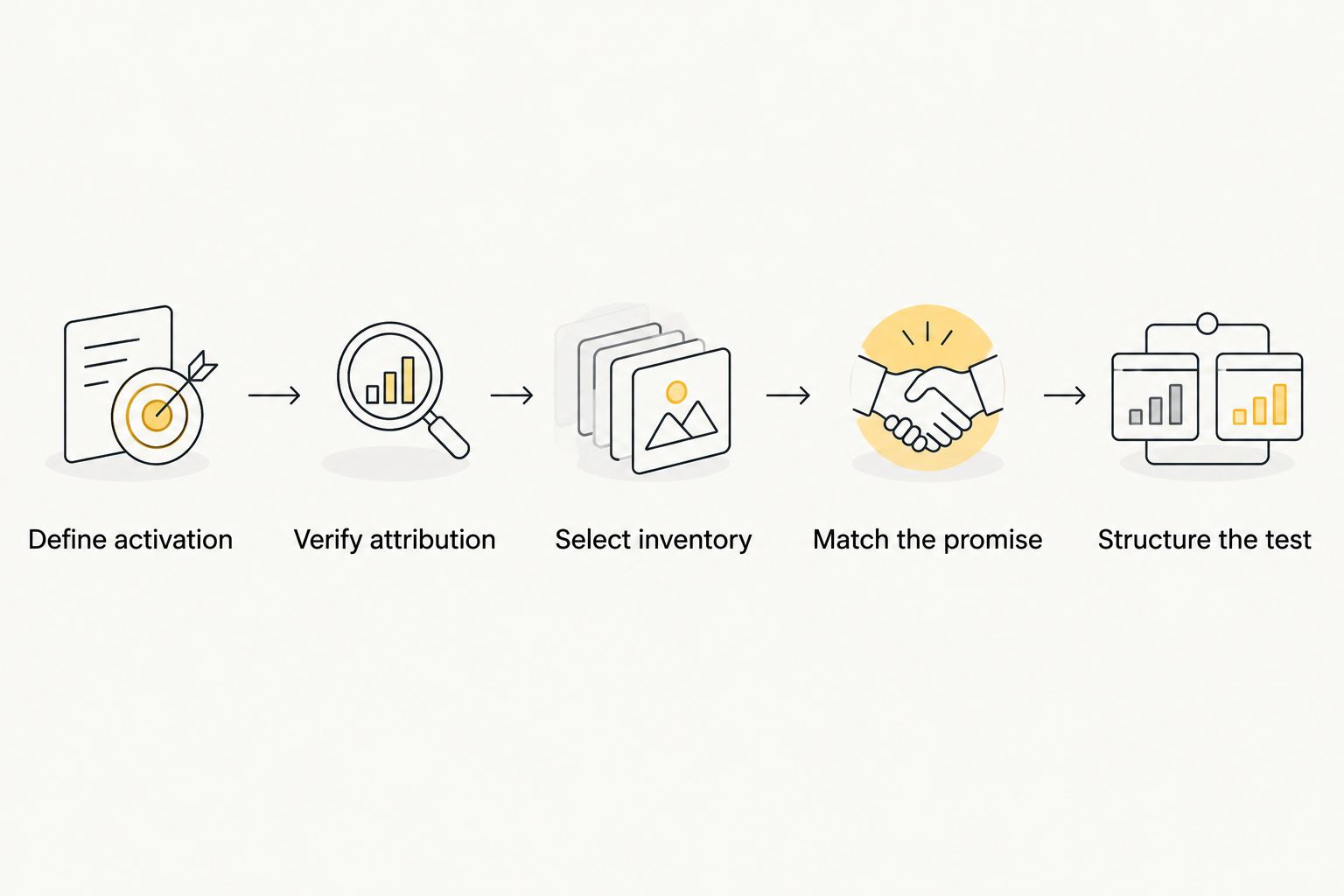
A campaign worksheet also makes handoffs easier. The person managing bids and the person checking app events should use the same definitions rather than separate interpretations of success.
- Write the hypothesis beside the campaign name.
- Separate segments with different languages or destinations.
- Record each creative and its associated promise.
- Define the event that determines campaign success.
- Document pause and expansion criteria before launch.
Evaluate user quality
Begin with a manual reconciliation of delivery, clicks, attributed installs, and activation. Look for the point where users stop progressing. Weak installation after a click calls for a different investigation than healthy installation followed by weak onboarding completion.
Use consistent definitions when calculating results. Cost per install uses attributed installs as its denominator; cost per activated user uses users who completed the defined activation event. A lower install cost does not establish better acquisition if those users never perform the core action.
Treat ad fraud as a measurement question, not an accusation based on one disappointing metric. Inspect unexplained event bursts, repeated identifiers where observable, inconsistent GEO signals, and conversion sequences that do not match the app journey. Investigate tracking errors alongside traffic-quality concerns before drawing a conclusion.
- Reconcile spend and events for the same reporting period.
- Compare activation within equivalent user cohorts.
- Inspect the journey between installation and activation.
- Review suspicious patterns with the available source detail.
- Separate tracking failures from genuine performance problems.
Expand proven segments
Use the observed campaign outcome to choose the next action. If a segment produces activated users under your predefined criterion, expand deliberately while keeping its measurement and proposition stable. If it fails, identify the failing stage before changing the bid.
Do not change the destination, creative, GEO, and traffic format together. You will lose the connection between the intervention and the result. Maintain a change log so another media buyer can understand what happened without reconstructing the campaign from screenshots.
Your 2026 expansion decision should also account for reporting delay. Evaluate cohorts that have had a comparable opportunity to activate, then inspect later events separately. Scaling an immature cohort because its install count looks strong confuses early activity with business value.
- Expand segments that meet the documented success criterion.
- Change a defined campaign variable at a time.
- Keep a dated record of material adjustments.
- Recheck attribution after destination or tracking changes.
- Review downstream user behavior after expansion.
Compare acquisition and notification options
Choose the option by the job it performs. Paid push acquisition, in-page push, owned notifications, and other paid formats are not interchangeable just because they can produce clicks. Compare them against the same app-side outcome where they serve an acquisition goal.
The table separates practical strengths from limitations. It does not rank networks by conversion performance: campaign outcomes require evidence from your app and target audience.
| Option | Best for | Practical strength | Key limitation |
|---|---|---|---|
| EZmob self-serve advertising | App developers testing paid push alongside other traffic formats | Access to push, pop, display, and native campaigns without a sales call | Requires campaign moderation and independent verification of app attribution |
| In-page push advertising | Testing notification-style placements within web pages | Offers a web-page placement rather than an owned app message | Placement context differs from subscribed push; evaluate it separately |
| Owned app notifications | Re-engaging existing app users | Connects messages to an existing app relationship | Does not acquire an audience that has never installed the app |
| Display or native acquisition | Testing visual or content-style app propositions | Provides another way to present the app’s value | Results do not establish how push inventory will perform |
Choose paid acquisition for new-user reach and owned notifications for existing-user engagement. If you test both, keep acquisition reporting separate from retention reporting so the contribution of each remains clear.
Common mistakes app developers make
Treating every install as an acquired customer
An install establishes that the app reached a device, not that the user received value. Track the core action and the relevant commercial event separately. Otherwise, you reward campaigns for an intermediate step while ignoring the outcome your business needs.
Sending users to the wrong store journey
A mismatched operating system, language, or destination introduces friction before the app can demonstrate value. Test the actual campaign destination, not just the store listing opened directly. Include redirects and campaign parameters in that check.
Using acquisition ads like retention messages
A new audience lacks the context an existing user has. Copy that references an unfinished task or an account status is inappropriate when the recipient has no relationship with your app. Explain the app’s function instead of assuming familiarity.
Optimizing bids before validating events
A bid change cannot repair missing or duplicated activation events. Confirm measurement before using CPA to pause sources or expand delivery. Keep a record of tracking changes so reporting shifts are not mistaken for campaign improvement.
Moving a winner across formats without retesting
A successful native creative is not proof of a successful push campaign. The placement, presentation, and user context differ. Preserve the underlying proposition, adapt the execution, and evaluate the new format on its own results.
FAQ
What are push notification ads for app developers?
Push notification ads for app developers are paid notification-style advertisements used to attract prospective app users. They differ from notifications an app sends to its existing users. Measure acquisition through attributed installs and meaningful app events.
Is paid push advertising the same as sending app notifications?
No, paid push advertising buys access to an advertising audience, while owned app notifications message existing users with the relevant permission. Keep acquisition and retention goals separate.
Is EZmob suitable for testing app acquisition?
EZmob suits app developers who want self-serve access to push, pop, display, and native advertising. Confirm campaign eligibility, available targeting, and your app attribution setup before launch; access to traffic does not guarantee activated users.
Should I send push ad clicks directly to an app store?
Use the destination that matches your campaign promise and supports your measurement plan. Test the complete journey on supported devices, including any redirects, before deciding whether a store destination or an explanatory landing page fits the campaign.
What should I measure besides app installs?
Measure the activation event that shows a user completed your app’s core task, then track the later event tied to business value. Keep those events separate from installs so you can identify where acquired users stop progressing.
Can I use the same campaign for Android and iOS?
Separate operating-system segments when their destinations, attribution conditions, or user journeys differ. Confirm the available targeting rather than assuming both systems support the same push inventory.
When should I expand a push acquisition campaign?
Expand when a segment meets your predefined success criterion using verified events and comparable cohorts. Keep the proposition and measurement stable during expansion, then review downstream behavior rather than relying only on new install counts.
One last thing
Before launching your next campaign, ask the person responsible for app analytics to show the activation event generated by a test user. Then ask the media buyer to identify where that user’s campaign attribution appears. A campaign is not ready for performance optimization until those records can be reconciled.
Keep that check in your 2026 launch routine. Better creative and more traffic cannot compensate for a reporting system that cannot distinguish installation from useful app activity.
Related guides
Define your activation event, verify the app journey, and start advertising on EZmob.