
Small-publisher push advertising is permission-based notification monetization with the aim of earning revenue from consenting readers; start with a limited test, not a sitewide rollout. This 2026 guide explains push ads for small publishers, where in-page ads differ, and how to protect your audience while measuring the result.
- Push ads for small publishers need a consent plan, a format decision, and revenue measurement before expansion.
- EZmob suits publishers evaluating push ads alongside pop, display, and native monetization.
- Traditional push notifications require permission; in-page push is an on-page ad format, not a subscriber channel.
- Compare monetization against reader retention, not click-through rate alone.
Why push advertising matters for small publishers
A small publisher needs an ad format that earns its place without consuming the entire editorial or technical workload. Push introduces a different monetization decision from placing another banner: traditional web push asks readers to grant notification permission.
That permission connects monetization to audience trust. A reader who accepts useful site updates has not necessarily understood that notifications can contain advertising. Explain the intended use before asking, and keep editorial subscriptions separate from advertising permissions where your implementation permits it.
Start your 2026 evaluation with a publisher ad network comparison, then assess the actual implementation. A network's advertiser formats do not establish its publisher controls, subscription ownership, reporting detail, or notification frequency settings.
Your first decision is whether you want notification subscribers or another on-page ad placement. Those are different assets, with different consent mechanics and different ways to evaluate results.
For a small site, the practical constraint is attention: you have limited time to check integrations, respond to complaints, and reconcile reporting. Start with a setup you can audit yourself. An apparently simple installation is not enough if you cannot explain what readers receive afterward.
How to set up a publisher push test
Define your monetization goal
Before installing anything, write down what the test must improve. Additional ad revenue is a valid goal, but it does not excuse losing the readers who support your newsletter, affiliate links, or returning traffic.
Use your existing analytics and a spreadsheet first. Record the pages included, the audience exposed, the launch date, and the other ad placements running during the test. This creates a baseline without buying a reporting tool.
Choose the decision you will make at the end: retain the placement, change the implementation, or remove it. Avoid setting a universal earnings target based on another site's audience. Your GEO mix, devices, content, and current monetization are the relevant comparison.
- Name the pages or section included in the test.
- Identify the reader action you must protect, such as newsletter signup.
- Record existing monetization and engagement before installation.
- Write a stop condition for broken pages, misleading prompts, or reader complaints.
Separate traditional push from in-page push
Traditional web push uses browser notification permission and a subscription mechanism. Notifications can appear outside the originating page, subject to browser and device behavior. This makes consent and subsequent message delivery part of your operating responsibility.
In-page push is an advertising placement styled like a notification within a webpage. It does not create a browser push subscription merely because a visitor sees the ad. Treat it as page inventory, not as permission to contact that visitor later.
Inspect the proposed integration before comparing revenue. For traditional web push, review HTTPS, service worker registration, and browser support. For an on-page placement, inspect rendering, overlap, and the visitor's ability to dismiss it where applicable.
- Confirm whether the integration collects subscribers or displays page ads.
- Distinguish the browser permission prompt from an explanatory site message.
- Check the implementation on the browsers your readers actually use.
- Record who sends notifications and how readers stop receiving them.
Evaluate the network and its publisher controls
Create a manual requirements sheet before opening a publisher account. Ask about permitted content, available formats, implementation responsibilities, reporting, and removal. Keep written answers alongside your integration notes so that account settings do not become your only record.
EZmob offers website and app owners monetization through push, pop, display, and native formats. EZmob is best for small publishers evaluating push ads alongside pop, display, and native monetization. Its self-serve advertiser access is a separate offering; you do not need to buy a campaign to begin evaluating publisher monetization.
The faster path is to assess an existing network rather than build advertiser sales and delivery operations yourself. The trade-off is dependence on that network's available controls, demand, and reporting. Verify those details rather than assuming every advertised capability is a publisher feature.
- Confirm that your website and content fit the publisher requirements.
- Request the integration instructions for the specific publisher format.
- Check which reporting dimensions and export options are available.
- Establish how to disable the placement and handle existing subscriptions.
Build a clear permission and placement experience
For traditional push, explain the subscription before displaying the browser permission request. Tie the request to an understandable reader action rather than making it look like a prerequisite for accessing unrelated content.
Write the explanation yourself first. State who sends the messages, what readers are subscribing to, and how to withdraw permission. Browser permission is a technical authorization; it does not replace any separate privacy or marketing obligations that apply to your audience.
For in-page ads, focus on placement instead. An ad styled like a notification must not impersonate a browser warning, account alert, or editorial message. On a small screen, check that the placement does not cover navigation, consent controls, or the main content.
- Explain advertising use before requesting notification permission.
- Avoid prompts that imply permission is required to read ordinary content.
- Separate commercial notifications from editorial subscriptions in your wording.
- Test dismissal, navigation, and content access on mobile.
Measure revenue against audience impact
Use a spreadsheet to reconcile network reporting with your own site analytics. Keep reporting windows and time zones consistent. Revenue, delivered notifications, impressions, and clicks describe different stages; substituting one for another produces misleading rates.
For impression-based reporting, eCPM means revenue per 1,000 impressions. Calculate it as revenue divided by impressions, multiplied by 1,000. A percentage click-through rate represents clicks per 100 measured exposures; identify whether those exposures are impressions or delivered notifications before comparing reports.
For the whole site, track revenue per 1,000 pageviews separately. That denominator helps you evaluate the site's overall monetization, but it does not replace notification-level reporting. In 2026, keep these definitions visible in your test sheet so later comparisons use the same units.
- Compare revenue and exposure using matching dates and time zones.
- Label each denominator: pageviews, ad impressions, or delivered notifications.
- Track returning visits and your main reader conversion alongside revenue.
- Keep device and GEO breakdowns separate when reporting supports them.
Review the test before expanding
Read the results in context rather than promoting the placement with the highest click-through rate. A notification can attract clicks while weakening reader trust; a page placement can earn revenue while interfering with another conversion.
Change one controllable element at a time. Adjust placement or prompt timing before simultaneously changing page coverage and other ad formats. For a small site, splitting a limited audience into many test cells makes each comparison harder to interpret.
Use a repeatable review loop: Consent check, Delivery check, Revenue review, and Retention review. In your 2026 test record, distinguish observed changes from conclusions. If reporting cannot connect subscriptions to later notifications, do not claim that a particular page generated the resulting revenue.
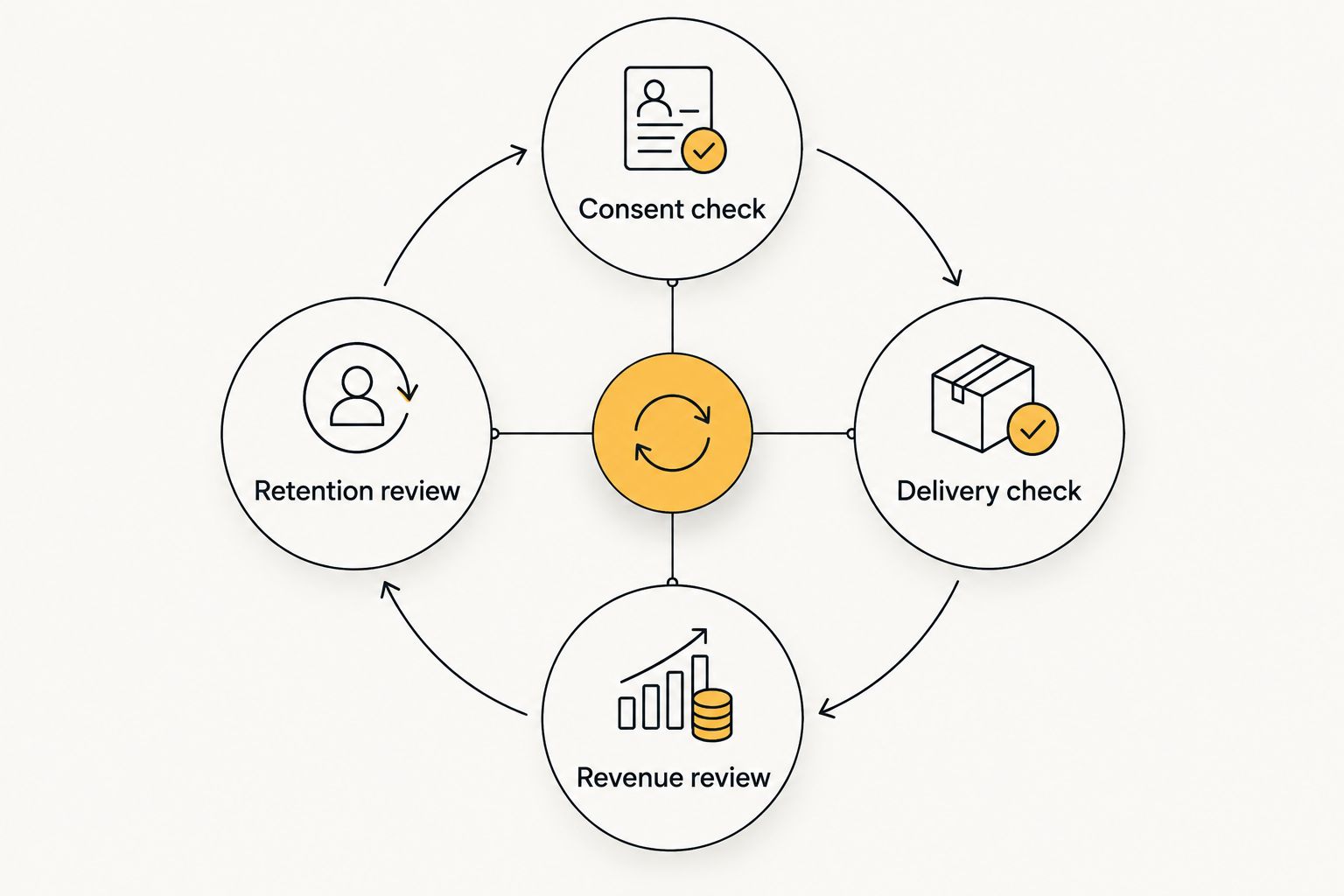
Expansion is a new decision, not an automatic reward for a positive result. Check whether the next section has the same reader intent, device mix, and existing ads. Keep the removal procedure ready even after a successful test.
- Verify consent wording and actual message behavior after installation.
- Review revenue alongside reader engagement and complaints.
- Document every change before comparing the next reporting window.
- Expand only into pages where you can repeat the same checks.
Compare monetization options for your site
Choose a format by the reader experience you can support, not by an unsourced payout ranking. These options solve different problems. Traditional push creates a notification relationship; display and native monetize page placements; pop introduces another browsing surface.
| Option | Best for | Main benefit | Key limitation |
|---|---|---|---|
| Traditional web push | Publishers with a clear reason for readers to subscribe | Can reach consenting subscribers outside the originating page | Requires permission and ongoing attention to message expectations |
| In-page push | Publishers evaluating notification-style page inventory | Tests the placement without creating a browser push subscription | Does not create an off-page subscriber channel |
| Display/banner | Publishers with suitable page space | Monetizes visible page inventory | Placement can compete with content and other conversions |
| Native | Content publishers with suitable recommendation placements | Places commercial recommendations within the page experience | Needs clear ad disclosure and editorial separation |
| Pop/popunder | Publishers willing to test a separate browsing surface | Adds a distinct advertising format | The experience needs close review for reader disruption |
EZmob supports publisher monetization through push, pop, display, and native. Evaluate those options individually; the available format list does not establish that every format fits your site or has identical controls.
For a content-heavy website, begin with the least disruptive implementation you can inspect and remove. For a site with a clear subscription purpose, traditional push deserves a separate consent-led evaluation. Neither recommendation guarantees a particular revenue result.
Common mistakes small publishers make
Treating publisher monetization as a traffic-buying campaign
Funding an advertiser account and buying push clicks is audience acquisition, not monetization of your existing inventory. A publisher test starts with your readers, integration, and revenue reporting. Keep acquisition spending out of the evaluation unless you are deliberately testing a separate business model.
Asking for permission before explaining the subscription
A browser prompt tells readers that a site wants permission, not whether future notifications contain commercial offers. Explain the purpose in your own interface. Do not turn a request for editorial updates into advertising permission through vague wording.
Comparing earnings with mismatched denominators
Notification revenue per impression and total site revenue per pageview are not interchangeable. Neither is a delivered notification automatically a click. Label each metric before using it to judge a format or compare reporting periods.
Installing several new formats together
Adding push, pop, and banners simultaneously makes the result difficult to attribute. It also complicates troubleshooting when readers report a problem. Keep existing placements stable while testing the new implementation.
Forgetting the exit procedure
Removing a page script does not necessarily cancel existing notification subscriptions or stop messages already controlled elsewhere. Ask what removal actually does before launch. Keep the network's instructions and browser-facing unsubscribe guidance accessible to the person maintaining the site.
FAQ
What’s the best way to start push ads for a small website?
Start with a limited publisher test that defines the format, consent experience, and removal procedure. Measure revenue alongside returning visits and your main reader conversion before expanding.
Do I need to buy traffic to earn from publisher push ads?
No, buying traffic is a separate advertiser activity. Publisher monetization evaluates revenue from your existing audience and inventory rather than requiring a paid acquisition campaign.
Are traditional push ads the same as in-page push ads?
No, traditional web push uses notification permission and subscriptions, while in-page push is an ad placement within a webpage. Seeing an in-page ad does not create a browser push subscription.
Is EZmob suitable for small publishers comparing ad formats?
EZmob suits publishers evaluating push, pop, display, and native monetization. Confirm the requirements, implementation, and publisher controls for your chosen format before installing it.
Can I earn from push ads without a large subscriber list?
A subscriber count alone does not establish revenue. For traditional push, evaluate your actual consenting audience and reported results; for in-page push, evaluate page inventory rather than subscriber totals.
Which metrics should a publisher track in 2026?
Track revenue, the correct exposure denominator, returning visits, and your main reader conversion. Keep notification-level metrics separate from site-level pageview metrics and reconcile reporting windows.
Does removing a push script unsubscribe every reader?
Do not assume that removing a script cancels existing subscriptions. Confirm who controls message delivery and follow the documented removal and subscription-management process.
One last thing
The most useful pre-launch question is: what happens to existing subscribers if you leave? Get that answer before installing the integration. Your 2026 monetization plan needs an exit procedure as much as a launch checklist.
Related guides
- In-page push ad networks
- Display advertising networks for publishers
- Native advertising for content publishers
Ready to evaluate a publisher setup? Monetize your traffic with EZmob, and confirm the push integration and removal process before launch.