
Instead of manually checking campaign destinations from your own IP, use a proxy setup for ad verification to inspect approved landing pages from the target GEO. For EZmob campaigns in 2026, route your verification browser or command-line client through the proxy—not the campaign’s paid traffic.
- Use a proxy setup for ad verification to inspect GEO-dependent redirects and landing pages, not reroute paid traffic.
- EZmob supports self-serve advertising; proxy verification is a separate quality-control workflow for media buyers.
- Keep one proxy session stable while checking a redirect chain, then repeat with a fresh session.
- Validate browser rendering separately: command-line requests do not execute JavaScript or reproduce push delivery.
Why this matters
A destination that works from your office can behave differently from another GEO. Geographic routing, language selection, consent screens, and offer restrictions can change the page a visitor receives. A successful page load alone does not establish that the visitor reaches the intended offer.
For the rules of thumb — when a proxy is a legitimate quality-control tool and when it crosses into traffic manipulation — see whether proxies can be used safely with ad campaigns.
EZmob is best for media buyers who want self-serve ad network access to pop, push, display, and native traffic. Proxy verification serves a narrower purpose: checking the destination experience under a defined network condition. It does not measure inventory quality, prove ad fraud, or predict CPA.
Keep destination checks separate from conversion tracking. The guide to connecting EZmob to Voluum addresses that adjacent workflow; this guide focuses on the route between your test client and the landing page.
For a 2026 campaign review, record what you tested and what actually happened. A screenshot without the destination URL, GEO, and session context leaves the next media buyer guessing.
Before you start
- Gather authorized access. Have your advertiser account, the campaign destination, permission to test any tracker or offer involved, and proxy credentials. Obtain the provider’s protocol, hostname, port, authentication method, and GEO-selection instructions.
- Separate testing from production. Use a dedicated verification browser profile and a test route that does not create billable clicks or production conversions. Store proxy credentials outside screenshots, campaign notes, and shared scripts.
- Check the session gotcha. A rotating proxy can change the exit IP between requests. Use a stable session for a redirect-chain check, and confirm whether DNS resolution happens locally or through the proxy.
Your 2026 verification record should also identify the campaign format and intended device. An IP address does not change your browser language, viewport, operating system, or subscription state. Match those conditions deliberately instead of treating the proxy as a complete visitor simulator.
Proxy session selection
Choose the connection behavior
- Read the proxy provider’s documentation for supported protocols and authentication. Use the supplied connection details exactly; do not infer a protocol from the port.
- Select the campaign’s intended GEO using the provider’s documented controls. Keep the campaign targeting unchanged while you establish a baseline.
- Choose session persistence for the redirect-chain test. Record the session identifier when the provider supplies one.
- Confirm the exit location using a service you trust. Compare it with the provider’s selected GEO before opening the campaign destination.
Expected result: your verification client has a documented proxy route and an exit location consistent with the intended test. A provider’s GEO label is not sufficient evidence by itself.
These session options answer different questions. Neither is a universal replacement for the other.
| Session option | Best for | Advantage | Limitation |
|---|---|---|---|
| Stable session | Following one visitor’s redirect chain | Keeps the network condition consistent during the check | Does not reveal variation across different exit IPs |
| Rotating session | Repeating checks across different exits | Exposes differences between separate test sessions | Can confound a redirect test if the exit changes mid-session |
Start with a stable session. Then repeat the same approved test with a fresh session to investigate differences. Changing GEO, cookies, device settings, and exit IP together makes the cause of a different result impossible to isolate.
Command-line routing
Configure the verification client
Use a command-line request to inspect HTTP responses before opening the destination in a browser. This separates server-side redirects from browser behavior. It also gives you a record you can compare after a campaign change.
- Create a private local environment containing
PROXY_URL,PROXY_USER,PROXY_PASS, andVERIFY_URL. SetVERIFY_URLto the approved test destination, not an invented tracking URL. - Confirm that your installed curl version supports the provider’s proxy protocol. For SOCKS,
socks5hrequests hostname resolution through the proxy;socks5uses local hostname resolution. - Run the request below. The empty
--noproxyvalue prevents an existing bypass list from silently sending this request directly. - Inspect the response headers and saved body before repeating the test.
curl --proxy "$PROXY_URL" \
  --proxy-user "$PROXY_USER:$PROXY_PASS" \
  --noproxy "" \
  --dump-header headers.txt \
  --output landing.html \
  --write-out '%{http_code}\n%{url_effective}\n' \
  "$VERIFY_URL"
This request saves the response headers to headers.txt and the response body to landing.html. It prints the HTTP status and effective URL. It intentionally does not follow redirects: inspect the initial response before allowing requests to additional destinations.
Expected result: you receive either a response from the approved destination or a connection error you can investigate. If the response redirects elsewhere, the Location header identifies the next hop; it does not prove that the final page works.
Security limitation: environment variables keep credentials out of the command’s literal text, but expanded arguments can still be visible to local process inspection. Run tests on a trusted machine. Use a protected curl configuration file when your environment requires stronger credential handling, and never disable certificate verification to force a test through.
Redirect-chain inspection
Capture the destination path
- Read each
Locationheader and confirm that the next destination belongs to the authorized test scope. Stop when a redirect points somewhere you do not have permission to inspect. - After confirming the route, repeat the command with
--locationadded. Keep--dump-headerso the response headers remain available for review. - Compare the final effective URL with the intended destination. Check the hostname, path, language, consent state, and offer eligibility rather than accepting any successful response.
- Save a short test record containing the campaign reference, timestamp, requested GEO, observed exit location, session identifier, and final destination. Redact credentials and sensitive tracking parameters.
Expected result: you can explain how the approved entry URL reaches the final server-side destination. An unexplained redirect is a failed verification even when the final page loads.
For an EZmob ad verification workflow, keep the proxy configuration in your test client. Do not place the proxy hostname or credentials in the campaign destination. Doing so changes the destination rather than configuring your inspection route.
A curl redirect trace covers HTTP redirects. It does not execute JavaScript, submit consent choices, or reproduce every browser cookie interaction. Treat the saved response as evidence of server behavior, not a screenshot-equivalent inspection.
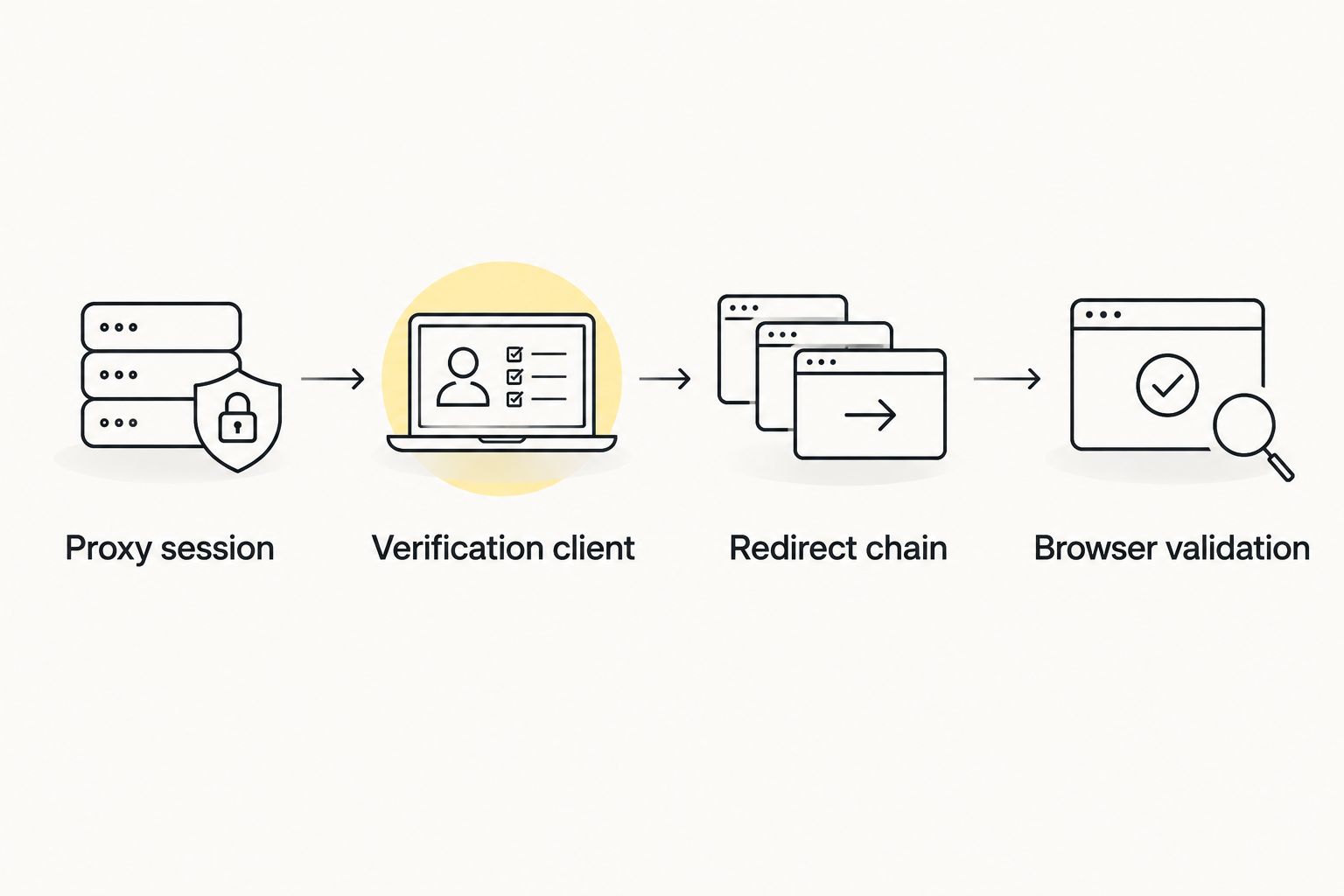
Browser validation
Inspect the rendered experience
- Open a dedicated browser profile containing no personal sessions, payment details, or unrelated account logins. Configure the proxy using the browser or operating system’s documented connection method.
- Confirm the exit location inside that browser. A working curl route does not establish that the browser uses the same route.
- Open the approved test destination with the intended language and device conditions. Inspect the visible offer, consent controls, forms, and final address.
- Use browser developer tools to examine network requests and JavaScript errors when the page looks wrong. Record the evidence without submitting a production lead or purchase.
Expected result: the approved destination renders correctly under the documented browser and GEO conditions, with no unexplained detour or blocked essential interaction.
A desktop browser with a narrow viewport is not a complete mobile-device test. Likewise, opening a push landing page does not reproduce notification permission, subscription, delivery, or the notification click. Check those mechanics through an authorized format-specific test process.
| Verification method | Best for | Advantage | Limitation |
|---|---|---|---|
| curl request | HTTP status and server redirects | Produces a repeatable response record | Does not execute page JavaScript |
| Dedicated browser | Rendering and interactive behavior | Shows consent, forms, and client-side redirects | Requires careful control of cookies and browser settings |
Use both methods before approving a destination. Their results answer different questions; a clean HTTP response cannot replace a rendered-page check.
Recheck whenever the destination changes
The adjacent workflow is regression verification: repeat the same checks after changing a landing page, tracker route, offer, or GEO rule. Keep the baseline conditions fixed so the comparison answers whether the change broke the intended experience.
- Preserve the previous test record before making the change.
- Update the approved test destination or route, then repeat the stable-session HTTP check.
- Repeat browser validation with the same device, language, and cookie conditions.
- Compare the redirect path, final destination, consent behavior, and essential interactions.
- Investigate differences before approving the changed destination.
For repeatable checks in 2026, automate the server-side request only within your authorized scope. Store secrets outside source control and keep response files access-controlled. Do not schedule uncontrolled visits to live tracking links that generate billable events.
Expected result: each destination change has a before-and-after record. Passing a regression check means the tested path still works; it does not establish that every GEO, device, or inventory source behaves identically.
Troubleshooting
The proxy rejects authentication
Check the hostname, port, protocol, and credential format against the provider’s documentation. Some providers use source-IP authorization instead of username-and-password authentication. Confirm the method before changing browser settings.
The browser still shows your usual location
Confirm the route inside the browser, not just in your terminal. Check proxy bypass rules, operating-system settings, and whether the browser uses a separate connection configuration. Stop testing until you can establish which route carries the request.
The destination changes between checks
Hold cookies, language, device settings, and session persistence constant. Then change one condition at a time. A different exit IP or cookie state is a changed test condition, not automatic evidence of cloaking or ad fraud.
curl works, but the browser fails
Inspect JavaScript errors, browser redirects, consent requirements, and blocked resources. Compare the browser’s actual final URL with the command-line result. Do not disable browser protections merely to obtain a successful screenshot.
A certificate warning appears
Stop and inspect the certificate and proxy configuration. A wrong hostname, interception setup, or trust configuration needs investigation. Bypassing the warning hides a security problem and invalidates a safe-verification check.
Customize your workflow
Build a test checklist around the conditions your campaign actually targets: GEO, device, language, consent state, and destination route. Give each test a clear pass condition. “The page opens” is weaker than “the intended offer renders and the authorized form works.”
Keep campaign QA separate from performance decisions. Proxy verification cannot tell you whether a bid is competitive, whether an inventory source converts, or whether a campaign meets its CPA target. Those questions require campaign and tracking evidence.
Assign destination checks to a named owner and retain the latest passing record. When an offer changes, that owner can repeat the same procedure instead of reconstructing the setup from screenshots.
FAQ
What’s the best proxy setup for ad verification?
Use a stable proxy session in the intended GEO, then inspect the approved destination with both curl and a dedicated browser. Repeat with fresh sessions only after establishing a consistent baseline.
Does EZmob campaign traffic need to pass through my proxy?
No: this workflow routes your verification client through a proxy, not paid campaign traffic. Keep proxy credentials out of campaign URLs and tracking parameters.
Can a proxy prove that an ad campaign is safe?
No: a proxy changes the network route but does not prove that a destination is free of malicious content. Use a dedicated test environment, retain certificate verification, and inspect unexpected destinations.
Is a rotating proxy better than a stable session?
A stable session is better for inspecting one redirect chain; rotation is useful for separate repeat checks. Changing exits during the same chain makes the result harder to interpret.
Why does my proxy GEO differ from the page language?
The page can use browser language, cookies, or account settings as well as IP location. Confirm each condition separately before diagnosing the destination.
Can curl verify push notifications or popunder delivery?
No: curl can inspect HTTP responses and server redirects, but it does not reproduce notification delivery or browser window behavior. Test those format mechanics separately through an authorized process.
Will verification clicks affect my campaign reports?
Verification requests can affect reports when they use live tracking or billable routes. Use an approved test route and identify test events before interpreting production performance.
One last thing
A successful verification request is not necessarily a successful ad experience. Server redirects can pass while browser scripts fail, and a landing page can render without proving that the ad format delivered correctly.
For your 2026 checks, preserve the distinction between network routing, destination behavior, and campaign performance. Approve each on its own evidence.
Related guides