
Streaming website owners’ ad monetization is the use of advertising around video content to earn revenue while preserving access to playback. For ad monetization for streaming websites in 2026, start with clearly separated display or native placements, then test pop and push against playback starts, completed views, and return visits—not ad revenue alone.
- Ad monetization for streaming websites should protect playback before increasing ad exposure.
- EZmob fits publishers seeking pop, push, display, and native monetization around streaming content.
- Compare revenue by GEO, device, and placement alongside playback starts and return visits.
- Treat in-player video advertising as a separate integration from website display inventory.
Why ad monetization matters for streaming website owners
Streaming publishers sell advertising around an activity visitors came to complete: watching content. An ad placement that interrupts the player, disguises a download button, or redirects someone before playback creates a conflict between monetization and the reason the visit exists.
Your decision is not simply which format earns revenue. It is which format earns revenue without making the viewing experience harder to use. In 2026, evaluate the player page, content discovery pages, and returning audience separately; each creates a different placement opportunity.
Start with the publisher ad network selection guide when assessing network options. For a streaming site, add playback compatibility, content eligibility, and control over disruptive creatives to the selection criteria.
Judge an advertising test by both revenue and viewing behavior. A placement that produces more ad interactions but fewer successful playback starts has not earned an automatic rollout. Keep content rights, privacy obligations, and visitor control in the same decision—not as checks after implementation.
How to monetize a streaming website in 2026
Confirm your content rights and inventory eligibility
Begin with a manual inventory review. List the pages you control, the content you have permission to distribute, and the placements you can change without interfering with a third-party player. Owning a website does not automatically give you permission to monetize every video embedded on it.
Separate your own page inventory from advertising inside a hosted player. A display slot beside an embedded video and a pre-roll inside that video are different placements, with different technical and contractual requirements. Do not describe them as interchangeable inventory when applying to a network.
Check the network’s publisher requirements against the actual site, including user-generated content, restricted categories, and traffic sources. Ask about unclear cases before adding tags. An advertiser-facing format list does not establish that the same format is supported for your publisher integration.
- Content rights: Record ownership, licenses, and any advertising restrictions.
- Page inventory: Identify placements you can edit directly.
- Player inventory: Confirm who controls advertising inside the player.
- Traffic sources: Document how visitors reach your streaming pages.
- Site requirements: Check content eligibility and privacy obligations.
Establish a baseline for viewing and revenue
Use your existing analytics and player events before adding another monetization tool. Define a playback start consistently: opening a page is not the same as starting the video. Likewise, an ad request is not evidence that an ad appeared or that someone watched the content.
Record viewing behavior by page type, device, and GEO. Compare like with like when assessing a placement change. A mobile discovery page and a desktop live-stream page should not share a single performance verdict simply because both contain video.
For your 2026 baseline, document the reporting definitions and time zone used by each system. Network reports and site analytics can count different events. Reconcile those definitions before treating a discrepancy as evidence of lost revenue or invalid traffic.
Keep a record of ordinary playback problems too. An existing player error should not be attributed to a new ad tag without checking the sequence of events.
- Playback starts: Track whether visitors actually begin viewing.
- Completed views: Measure completion where the content format makes it meaningful.
- Return visits: Monitor whether viewers come back after exposure.
- Placement revenue: Separate earnings by the inventory being tested.
- Playback errors: Record failures alongside device and browser details.
Match each format to a specific viewing surface
Start manually by drawing your page layout and marking the player, playback controls, navigation, and advertising areas. Put the first test where advertising can remain visibly separate from the viewing controls. Do not begin by adding every format the network supports.
EZmob is best for streaming publishers seeking pop, push, display, and native website monetization. The network supports those publisher formats, giving you a route to test them without arranging a separate direct advertising deal for each placement. That does not establish support for pre-roll or mid-roll inside your particular video player.
Display and native placements belong in the page-layout discussion. Popunder belongs in an interruption test. Push requires a separate decision about permission and notification expectations. These formats solve different problems; combining them immediately makes the result harder to diagnose.
Document the purpose of each proposed placement before implementing it. A content discovery page can accommodate a clearly labeled recommendation-style unit, while the playback page needs particular care around controls and focus.
- Display: Keep banners distinct from player controls and navigation.
- Native: Label advertising and separate it from editorial recommendations.
- Popunder: Test browser behavior and the effect on the viewing session.
- Push: Make notification permission separate from access to playback.
- Player video: Verify publisher support and player compatibility independently.
Implement placements without breaking playback
Add a placement to a controlled test page first. Use browser developer tools and real playback checks to inspect script errors, loading behavior, focus changes, and accidental overlays. A page that looks correct before playback can behave differently after the player enters fullscreen.
Test the full visitor path: discover a video, open its page, start playback, pause, resume, and leave fullscreen. Include any permission prompt in that path. The relevant question is whether the visitor can still complete the viewing task without confusing an advertisement with a site control.
Use the same implementation checklist for every 2026 placement change. Keep a copy of the last working page configuration so you can remove a failing tag without rebuilding the entire layout. Prefer an isolated placement change over changing the player and monetization setup together.
Never require an advertising interaction as a substitute for clear playback controls. If an ad sits near a play button, inspect its boundaries on small screens as well as desktop.
- Mobile layout: Check overlap around play, volume, and fullscreen controls.
- Browser behavior: Inspect pop blocking, focus changes, and notification prompts.
- Loading behavior: Compare player readiness before and after the tag.
- Privacy controls: Check that advertising follows applicable consent requirements.
- Rollback: Keep the previous working configuration ready to restore.
Run a controlled placement test
A spreadsheet and consistent reporting exports are enough to start. Write down the placement, format, audience segment, and success criteria before launching. Change one placement or format at a time so the result has an identifiable cause.
Keep the test and comparison traffic as similar as your setup allows. A change in content popularity, acquisition source, or GEO mix can change results without any improvement in the ad placement. Record those changes rather than crediting the ad format automatically.
Set the test duration around your audience’s viewing patterns and the volume needed to interpret the result. Do not declare a winner from an isolated session or an unusually busy broadcast. Avoid assigning a universal test budget or duration to sites with different traffic and content schedules.
Keep a placement only when its revenue contribution and viewing impact meet your written criteria. If revenue improves while playback deteriorates, revise the placement or restrict its use rather than expanding it unchanged.
- Test scope: Name the page type, format, and placement.
- Audience segment: Record GEO, device, and acquisition source.
- Success criteria: Define acceptable revenue and viewing outcomes.
- Change log: Note content, player, and traffic changes during the test.
- Decision: Keep, revise, or remove the placement based on the same criteria.
Review quality before expanding inventory
Inspect the actual advertising experience, not just the earnings report. Visit representative pages on the devices your audience uses and check whether creatives remain distinguishable from site content. Save details of problematic ads so the network can investigate the correct placement and creative.
Investigate unusual traffic or interaction patterns before assuming a placement has become more valuable. Compare network reporting with acquisition sources and player events. A spike in ad interactions without a corresponding viewing pattern deserves review; it does not prove ad fraud by itself.
Your 2026 expansion plan should follow the placements that pass both performance and quality checks. Add inventory gradually, with a documented reason for each addition. Keep checking the original placements after expansion because the combined page experience matters too.
Assign responsibility for reviewing complaints and removing harmful placements. Monetization needs an operational owner, not just a script installed once and forgotten.
- Creative quality: Check misleading controls and inappropriate advertising.
- Traffic quality: Investigate unexplained changes by source and GEO.
- Viewer feedback: Categorize complaints about playback and advertising separately.
- Placement records: Save page, device, time, and creative details.
- Expansion criteria: Extend only placements that pass your viewing checks.
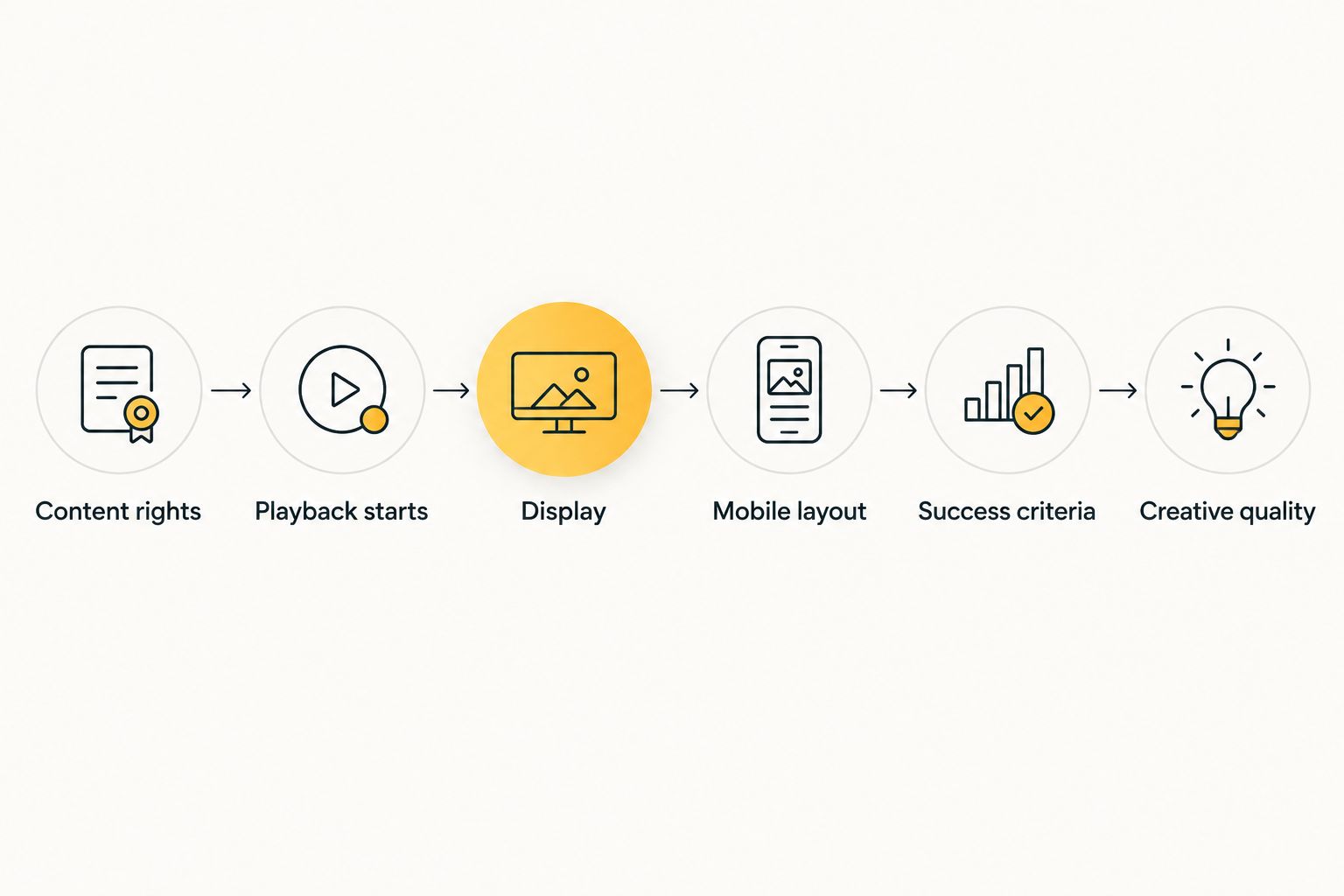
The process is sequential: confirm eligibility, establish the baseline, select a format, implement it, test it, and review quality. Skipping the baseline leaves you unable to distinguish a monetization gain from a change in audience mix.
Compare monetization options for streaming publishers
Choose the format around the viewing surface and the controls you need. The table separates website advertising from in-player advertising; it does not rank networks by earnings or promise a payout.
| Option | Best for | Practical advantage | Key limitation |
|---|---|---|---|
| EZmob publisher formats | Publishers testing pop, push, display, and native around streaming content | Access to several supported website monetization formats | Confirm publisher integration requirements; do not infer in-player video support from advertiser offerings |
| Display placements | Player pages with clearly separated advertising space | Visible advertising boundaries outside the player | Poor placement can compete with controls or crowd a small screen |
| Native placements | Content discovery pages and recommendation areas | Advertising can sit alongside content browsing when clearly labeled | Unclear labeling can make sponsored content look editorial |
| Popunder placements | Publishers prepared to test browser and session effects | Does not require a banner position inside the page layout | Browser restrictions and focus changes require direct testing |
| Push notifications | Publishers with an audience that explicitly wants notifications | Creates a notification channel separate from the playback page | Requires permission and careful management of visitor expectations |
| In-player video advertising | Publishers with confirmed player-side advertising support | Places advertising within the viewing sequence | Depends on content rights, player integration, and compatible demand |
Do not choose by format name alone. Ask what you can control, how reporting distinguishes placements, and how you remove a problematic creative or integration. A network relationship does not replace your responsibility for the viewing experience.
Common mistakes streaming website owners make
Treating advertiser video support as publisher player support
A network can offer video campaigns to advertisers without supporting your player’s pre-roll integration. Confirm the publisher implementation explicitly. For EZmob, evaluate the stated publisher formats separately from advertiser video campaign capabilities.
Measuring page visits instead of successful viewing
A video page load does not establish that playback began. Track player events alongside ad reporting, and investigate changes by device and placement. Otherwise, a monetization test can look healthy while the central viewing task deteriorates.
Placing ads where viewers expect playback controls
An advertisement near a play button needs clear separation. Avoid layouts that make an ad resemble a download, pause, or fullscreen control. Inspect the rendered page on mobile rather than relying on a desktop preview.
Requesting push permission before establishing its purpose
A visitor arriving to watch a stream has not automatically expressed interest in notifications. Explain what the notification channel is for and keep permission separate from playback access. Review the notification experience as its own product decision.
Expanding formats before isolating their effects
Adding display, popunder, and push together obscures which change affected viewing behavior. Test separately, then assess the combined experience before wider deployment. Keep a removal path for each format instead of making rollback an all-or-nothing decision.
FAQ
What’s the best way to start ad monetization for streaming websites?
Start with a clearly separated display or native placement and measure its effect on playback. Confirm content rights and network eligibility first, then compare placement revenue with playback starts and return visits.
Can I monetize a streaming website with EZmob?
EZmob allows website owners to monetize traffic using pop, push, display, and native formats. Confirm that your content and intended implementation meet the publisher requirements before adding advertising tags.
Are popunder ads better than banner ads for streaming websites?
Neither format is automatically better for a streaming website. Banners require suitable page space, while popunder placements require checks for browser behavior and session disruption; compare both against your viewing metrics.
Does offering video ads mean a network supports pre-roll in my player?
No, advertiser video campaigns do not establish publisher-side pre-roll support. Confirm the player integration, content rights, and supported advertising implementation separately.
Do viewers need to accept push notifications to watch a stream?
Keep notification permission separate from access to playback. Explain the notification purpose and allow visitors to make that choice without confusing it with a player requirement.
What should I measure besides advertising revenue?
Measure playback starts, relevant completion events, return visits, and playback errors. Break those results down by placement, device, and GEO so a site-wide average does not hide a viewing problem.
Can I run ads around embedded videos I do not own?
Embedding a video does not automatically grant rights to monetize the content or insert ads inside its player. Check the content license, embedding terms, and network requirements before implementing advertising.
How do I decide whether to keep a new placement?
Keep a placement when its revenue contribution and viewing impact meet your predefined criteria. Compare similar audiences and record other site changes before attributing the result to advertising.
One last thing
Test the page after declining a notification prompt, not just after accepting it. Then test playback after closing an advertisement and returning from fullscreen. These paths expose implementation problems that a screenshot of the page cannot show.
Your final acceptance test is a complete viewing session, not a successful ad request. Make that the release requirement for every new placement.
Related guides
- Display advertising networks for publishers
- Popunder ad network options
- Native advertising for content publishers
Monetize your traffic with EZmob. Start with a supported publisher format and a placement you can test without compromising playback.