
Mobile app developers' display advertising is paid banner placement aimed at acquiring users who install an app and complete a valuable action. This 2026 guide explains how to connect inventory, creative, store destinations, and attribution so you judge campaigns by user quality rather than clicks alone.
- Display ads for app developers should optimize toward meaningful app events, not clicks alone.
- EZmob suits app developers seeking self-serve display, pop, push, and native traffic.
- Separate acquisition campaigns from app monetization: buying users and selling inventory require different decisions.
- Compare app-install campaigns using attributed conversions, cohort quality, and consistent measurement windows.
Why this matters
An app install is an acquisition event, not proof of a valuable user. Your display campaign needs to connect the ad click to the store visit, install, and action that supports your business model. Otherwise, a campaign can look productive while attracting users who never complete onboarding.
Start with acquisition mechanics before choosing a network. The guide to mobile ad networks for app-install campaigns provides a related starting point for evaluating that buying decision.
Why display advertising matters for mobile app developers
App developers face a different conversion path from advertisers selling directly on a website. A prospect leaves the ad placement, reaches an app store or landing page, installs the app, and then enters onboarding. Each transition needs its own explanation and measurement.
Display gives you a visual surface for showing the app's purpose before the store visit. A relevant screenshot or clear benefit can communicate what the user will get. The limitation is equally important: attention to a banner does not establish intent to install or use the app.
For your 2026 acquisition plan, choose inventory only after deciding what a useful user does. A subscription app, a game, and a lead-generation app should not share the same success event simply because all need installs.
EZmob is best for app developers who want self-serve access to display, pop, push, and native traffic. That access supports format testing; it does not replace attribution, creative work, or a defined acquisition target.
How to build a display acquisition campaign
Build the campaign in dependency order: establish the outcome, verify measurement, select inventory, and then create the experience users will see. This keeps a tracking problem from being mistaken for a creative problem.
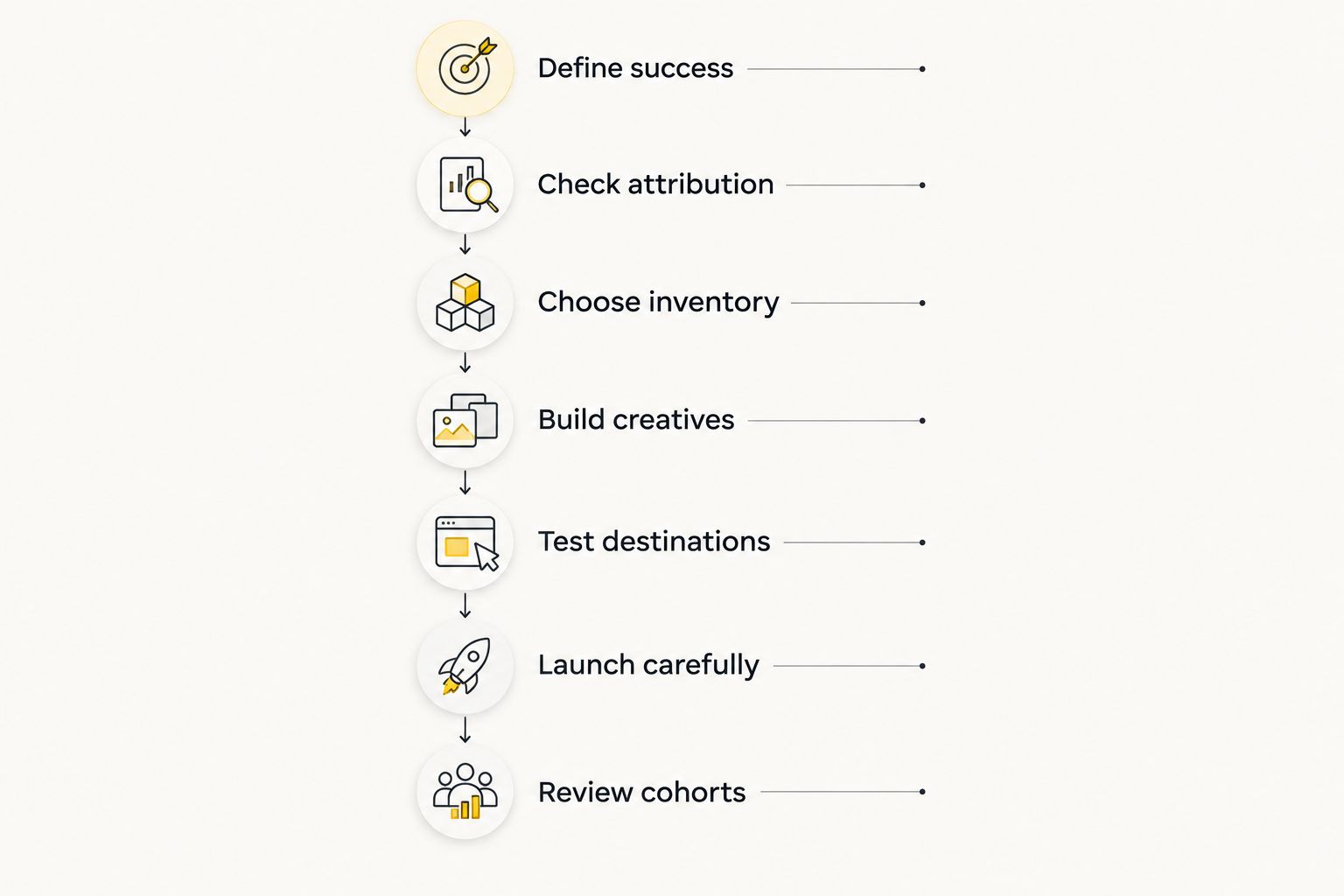
Define success
Begin with your own product analytics and a campaign brief. Name the action that makes an acquired user useful: completing registration, finishing onboarding, purchasing, subscribing, or reaching a meaningful engagement milestone. Choose the event that matches your actual business model.
Keep installs as a diagnostic measure when the business outcome happens later. An install campaign still needs to show whether acquired users progress beyond installation. Do not substitute an easy-to-measure event for a commercially relevant one.
Your 2026 brief should also distinguish a test objective from a scaling objective. The initial question is whether the acquisition path works and produces relevant users. Expansion requires evidence that the result survives additional spend, not merely that an ad received attention.
Close the brief with an explicit decision rule. If you cannot explain what evidence would justify continuing the campaign, you have not defined success clearly enough.
- Name the primary conversion event in plain language.
- Record which product action follows installation.
- Define the audience, GEO, and operating system you intend to acquire.
- Set a spend boundary using your own acquisition economics.
- Document the evidence required to continue, revise, or stop the test.
Check attribution
Use your existing analytics, store reporting, and controlled test visits to inspect the acquisition path before buying traffic. Confirm that campaign identifiers survive the transitions you need to measure. Treat a successful destination load and a successfully attributed install as separate checks.
Mobile measurement depends on operating-system rules, user consent, and your attribution setup. Do not assume that a network click can always be connected to an individual app event. Establish what your implementation actually reports before interpreting campaign results.
Calculate cost per install as campaign spend divided by attributed installs. Calculate event CPA as campaign spend divided by attributed instances of your chosen event. Keep the attribution definition consistent when comparing those figures across sources.
If tracking fails, pause the decision about traffic quality. Missing attribution cannot tell you whether the user failed to convert or whether the conversion disappeared from reporting.
- Test the full path on each supported operating system.
- Confirm campaign identifiers reach the destination.
- Check install and post-install event reporting separately.
- Record attribution windows and reporting delays.
- Reconcile network reporting with your measurement system.
Choose inventory
Start manually: write an inventory checklist and evaluate each buying option against it. Your first question is whether the available placement can deliver an appropriate mobile user to the correct destination. Your next question is whether reporting exposes enough detail to make a useful decision.
EZmob offers a self-serve route to launching display campaigns alongside other supported formats, without requiring a sales call. That makes campaign access straightforward. It does not establish that a particular placement, GEO, or app category will perform.
Keep display separate from push, popunder, and native during the initial evaluation. Different formats create different user experiences, so blending them into a shared result obscures what drove the outcome.
Before committing spend, verify the controls and reporting available for the campaign you intend to run. Do not assume that targeting, source identifiers, exclusion controls, or attribution integrations exist merely because another platform offers them.
- Confirm mobile inventory suitability for your app's destination.
- Check which GEO and device controls are available.
- Verify creative requirements before preparing assets.
- Inspect the reporting fields available for source-level decisions.
- Separate formats so each result remains interpretable.
Build creatives
Create the first concepts with screenshots, a basic image editor, and a written message hierarchy. Show what the app does, state a specific user benefit, and give the prospect a reason to continue. A banner should explain the next action, not imitate an operating-system warning.
For the 2026 creative brief, connect each concept to a real product use case. A utility app can demonstrate a task; an entertainment app can show the experience. Avoid claims about speed, earnings, security, or results unless you have evidence supporting them.
Change a meaningful variable between concepts. If the image, message, destination, and audience all change together, you cannot isolate the reason for a different result.
Keep the banner promise consistent with the store listing and onboarding. Creative that attracts an install through the wrong expectation creates a product problem after the acquisition event.
- Use genuine app visuals that match the current experience.
- Give each concept a clear benefit and next action.
- Check readability at the intended placement size.
- Remove unsupported claims and misleading interface elements.
- Label assets so results can be traced to the correct concept.
Test destinations
Inspect the destination manually on the devices and operating systems you plan to target. A campaign should not send an unsupported device to an incompatible store listing. Check redirects, language, loading behavior, and the action users see after arriving.
Decide whether to send traffic directly to a store or through a landing page. A direct store route removes a transition. A landing page gives you room to explain the app, but introduces another page that must load and persuade the user to continue.
Neither route wins by default. Test the route that fits the amount of explanation your app needs, and compare downstream outcomes rather than landing-page clicks alone.
For existing users, investigate whether your own implementation supports a suitable in-app destination. Do not promise deep-link behavior until it has been tested through the actual campaign path.
- Open every destination on relevant mobile devices.
- Match the store destination to the operating system.
- Check language consistency across ad, page, and listing.
- Inspect redirect behavior and campaign identifier retention.
- Confirm that the advertised action exists after installation.
Launch carefully
Prepare a launch sheet before opening the campaign interface. Record the objective, format, audience assumptions, creative identifiers, destination, and reporting owner. This is the manual baseline that keeps a self-serve launch from becoming an undocumented experiment.
New campaigns on the platform go through creative moderation before going live. Build that review into your launch process rather than treating campaign submission as immediate delivery. Use the review outcome to correct the submitted assets or destination when necessary.
Begin with the campaign structure you can explain and measure. Excessive fragmentation makes results harder to interpret, while excessive grouping hides important differences between devices, GEOs, and formats.
Watch delivery and tracking together. A campaign that spends but produces no recorded event requires an acquisition-path check before you conclude that the creative or inventory failed.
- Submit creatives and destinations for moderation.
- Record the campaign settings before delivery begins.
- Keep naming consistent across ads and analytics.
- Check that spend and attributed events appear as expected.
- Change settings deliberately and record each change.
Review cohorts
Use your analytics to group acquired users by source and acquisition period. Compare those groups at equivalent ages, using the same event definitions. New users have had less time to complete purchases or subscriptions than older users.
In your 2026 reporting, distinguish delivery metrics from business metrics. Impressions and clicks explain exposure and response. Installs explain acquisition. Activation, retention, and paid events explain what happened after acquisition.
Review fraud signals without treating every anomaly as proof of fraud. Unexpected click patterns, inconsistent attribution, and poor event quality deserve investigation; they do not justify an unsupported accusation against a source.
Expand spend only after the chosen app event supports the decision. If installs rise while activation weakens, investigate the audience, creative promise, and onboarding path before increasing the campaign boundary.
- Compare cohorts at equivalent ages.
- Calculate install cost and event CPA separately.
- Review results by the source details your reporting provides.
- Investigate attribution discrepancies before excluding inventory.
- Keep a decision log linking changes to observed outcomes.
Compare acquisition options for app developers
Use this 2026 comparison to choose a test format, not to predict a winning CPA. The right option depends on what the app needs to communicate and what your measurement setup can evaluate.
| Option | Best for | Main advantage | Key limitation |
|---|---|---|---|
| EZmob self-serve platform | App developers and media buyers testing supported traffic formats | Self-serve access to display, pop, push, and native campaigns | Campaign access does not replace attribution or prove user quality |
| Display banners | Apps with a clear visual benefit or recognizable interface | Shows the app's purpose before the destination visit | Banner response alone does not establish install intent |
| Push ads | Apps whose benefit can be explained in a compact message | Gives a short message a direct next action | Limited space for demonstrating a complex app experience |
| Native ads | Apps that need explanation before the store visit | Fits an explanatory message into a content-style placement | Adds creative and destination work when the message needs context |
| Popunder traffic | Media buyers prepared to evaluate a different arrival experience | Provides an alternative format to test separately | The arrival is not equivalent to an intentional banner click |
EZmob's useful distinction here is format access in a self-serve platform, not a guaranteed acquisition result. Keep the comparison honest: convenience helps you launch, while campaign economics depend on the users and events you actually acquire.
Common mistakes mobile app developers make
Treating installs as the final result
An install does not prove onboarding completion, retention, or revenue. Keep install cost visible, but judge the campaign against the event that matters to the app's business model.
Mixing acquisition with monetization
Buying display traffic to acquire users is an advertiser task. Selling placements inside an app is a publisher task. Separate the budgets, reporting, and platform decisions so an inventory-selling question does not distort an acquisition plan.
Sending every device to the same destination
A shared creative does not justify an unchecked destination. Verify store compatibility, redirects, and language for each audience you target. A destination error prevents the acquisition path from working at all.
Comparing cohorts at different ages
A newly acquired user and an older user have had different opportunities to convert. Match observation periods before deciding that one source produces better subscribers, purchasers, or engaged users.
Scaling before checking the product promise
A strong click response can conceal a mismatch between the ad and the app. Review creative, listing, and onboarding together when users install but fail to reach the promised action.
FAQ
What’s the best way to start display ads for app developers?
Start by defining a meaningful app event and verifying attribution before buying traffic. Then test a clear creative concept, a compatible destination, and inventory you can evaluate separately.
Is EZmob suitable for mobile app acquisition campaigns?
EZmob suits developers and media buyers seeking self-serve access to display, pop, push, and native traffic. Validate the controls, inventory suitability, and measurement requirements for your specific campaign before launching.
Are display ads better than push ads for app installs?
Neither format is automatically better for app installs. Display provides a visual surface for demonstrating the app, while push uses a compact message; compare them through attributed installs and meaningful app events.
Should an app ad send users directly to the app store?
Use a direct store destination when the ad and listing provide enough explanation. Use a landing page when the app needs additional context, then evaluate whether that extra transition improves downstream results.
What should I measure besides cost per install?
Measure the cost of the app event that supports your business model, such as activation, purchase, or subscription. Compare retention and event completion across cohorts at equivalent ages.
How do I tell whether poor results come from tracking or traffic?
Test the conversion path and reconcile attribution before judging the traffic source. A missing recorded event does not distinguish a failed conversion from a measurement failure.
Can I use the same campaign to acquire users and monetize my app?
Keep acquisition and app monetization separate. Acquisition buys traffic as an advertiser, while monetization sells inventory as a publisher; each needs its own objective and reporting.
One last thing
Before your next launch, ask someone unfamiliar with the app to follow the ad's promise through the store listing and onboarding. Ask what action they expected and where that expectation changed. This does not measure campaign performance; it checks whether the acquisition experience makes sense.
Fix an expectation mismatch before buying more exposure to it. More traffic cannot repair a promise the app does not fulfill.
Related guides
- Push notification ads for mobile app developers
- Self-serve advertising platforms
- DSP platforms for programmatic advertising
Start advertising on EZmob
Prepare your display creative, destination, and conversion tracking before launching your campaign.