
Yes, you can run push ads without a mobile app by buying browser-based push traffic and sending clicks to a website, landing page, or affiliate offer. You do not need to publish an app or collect your own notification subscribers when you buy existing ad-network inventory. Traditional web push still depends on the recipient’s browser permissions and device support; it does not guarantee conversions.
- Push ads without a mobile app can send browser notification clicks directly to a website or affiliate landing page.
- EZmob suits media buyers who want self-serve push advertising without building an app.
- Traditional web push requires subscriber permission; in-page push appears inside a webpage instead.
- Judge push traffic by tracked conversions and CPA, not notification clicks alone.
Can push notification ads work without a mobile app?
A mobile app is not a prerequisite for buying push notification ads. The app, the notification delivery system, and the advertiser’s destination are separate things. Browser-based notifications can carry an advertising message whose click opens a website rather than an installed application.
The practical distinction in 2026 is between buying notification inventory and building a notification audience yourself. An advertiser buying inventory supplies the campaign and destination. A website collecting subscribers must also handle permission, subscription, and notification delivery.
| Approach | Best for | Does the advertiser need an app? | Main benefit | Main limitation |
|---|---|---|---|---|
| Traditional web push ads | Media buyers promoting web-based offers | No | Sends an ad through a browser-based notification subscription | Delivery depends on permission and browser support |
| Native app notifications | Businesses messaging their own app users | Yes, for the app-based approach | Connects notification messages with an installed app | Requires an app and notification permissions |
| In-page push ads | Advertisers seeking a notification-like placement on websites | No | Displays a push-style ad within a webpage | Does not reach the visitor after the page is closed |
These approaches are not interchangeable. A notification-like design does not prove that an ad uses browser push, and a mobile impression does not prove that the recipient installed an app.
For measurement setup, the EZmob and Voluum conversion-tracking guide addresses the next practical question: how to connect traffic purchases with recorded outcomes.
Why this matters
Building an app introduces a separate product decision. You need a reason for people to install it, an experience worth returning to, and a plan for maintaining it. None of that is necessary merely to advertise a web-based offer through push inventory.
For an affiliate marketer, the relevant question is simpler: can the traffic reach a working landing page and produce the conversion the offer pays for? A browser notification can provide that entry point without making an app part of the funnel.
Choose the destination around the conversion, not around the notification format. A lead-generation offer needs a usable form. An e-commerce offer needs a usable purchase path. A software offer needs a clear next action. Adding an app requirement where none exists creates another obstacle between the click and that action.
Traditional web push: no advertiser app required
Traditional web push starts with a browser subscription. A visitor permits a website to send notifications, and the subscription enables messages to reach that browser through the web push system. The notification can contain a link that opens when the recipient clicks.
When you buy this inventory, you are purchasing access to an existing advertising audience rather than asking every prospect to subscribe to your own website first. Your landing page receives the click. It does not need to deliver the original notification.
Best for: media buyers testing offers that convert on the web. The benefit is separation: your advertising destination can remain a website while the inventory supplier handles its subscriber-side delivery arrangements.
The limitation is equally important. Browser permissions, subscription status, operating-system behavior, and supported environments affect whether a notification can be delivered. Buying push traffic does not turn every device into an eligible recipient, and delivered notifications do not establish purchase intent.
Native app notifications: a different delivery route
Native app notifications belong to an installed application. They serve a different purpose from buying browser-based push traffic: the app operator communicates with users through the app’s notification infrastructure.
Best for: businesses that already have an app and want to message its users. An app notification can point users toward relevant app content, subject to the application’s setup and the user’s permissions. That connection is useful when the intended action actually happens inside the app.
The trade-off is the app requirement itself. If your offer converts on a website, building an application solely to obtain notification access adds work without answering whether the advertising offer performs.
For a 2026 acquisition plan, separate these decisions. Decide whether the business needs an app on product grounds. Decide whether push advertising deserves a test on traffic quality, conversion tracking, and offer fit.
In-page push: no notification subscription required
In-page push is a webpage ad designed to resemble a notification. It appears within the page the visitor is viewing; it is not the same delivery mechanism as a permission-based browser notification.
Best for: advertisers who want a push-style placement while the audience is browsing a website. Its defining advantage is that displaying the ad does not depend on the visitor granting browser notification permission.
Its defining limitation is placement. An in-page ad cannot continue appearing as a browser notification after the visitor leaves that page. Treat it as its own inventory type rather than assuming that its results describe traditional web push.
Before comparing campaigns, confirm what the supplier means by push. Record the actual delivery format in your campaign notes. Otherwise, a report can combine different user experiences under the same label and obscure which placement produced the outcome.
Why push campaign results vary
Running push ads without an app solves a delivery requirement, not the entire acquisition problem. In 2026, evaluate the campaign through these factors rather than using app ownership as a performance shortcut:
- Offer fit. The ad must introduce something the recipient can understand and act on. A message that attracts curiosity but misrepresents the landing page creates clicks without a coherent conversion path.
- Delivery environment. Traditional web push depends on supported browsers, permissions, and subscriptions. In-page push depends on a webpage placement. Keep those conditions separate when judging reach and results.
- Landing-page experience. The destination must work on the devices receiving the traffic. Broken forms, confusing redirects, and unreadable layouts interrupt the funnel regardless of how the visitor arrived.
- GEO and language. The offer, creative, and destination must suit the intended audience. A working notification is not enough if the visitor cannot use the offer in their location or understand its terms.
- Measurement quality. A click count does not identify accepted leads, completed purchases, or other payable actions. Track the outcome that matters and distinguish recorded events from approved conversions.
These factors explain why a technically valid campaign can still fail commercially. No app required describes the setup; it does not describe profitability. The campaign still needs a relevant offer, an honest message, and an observable conversion path.
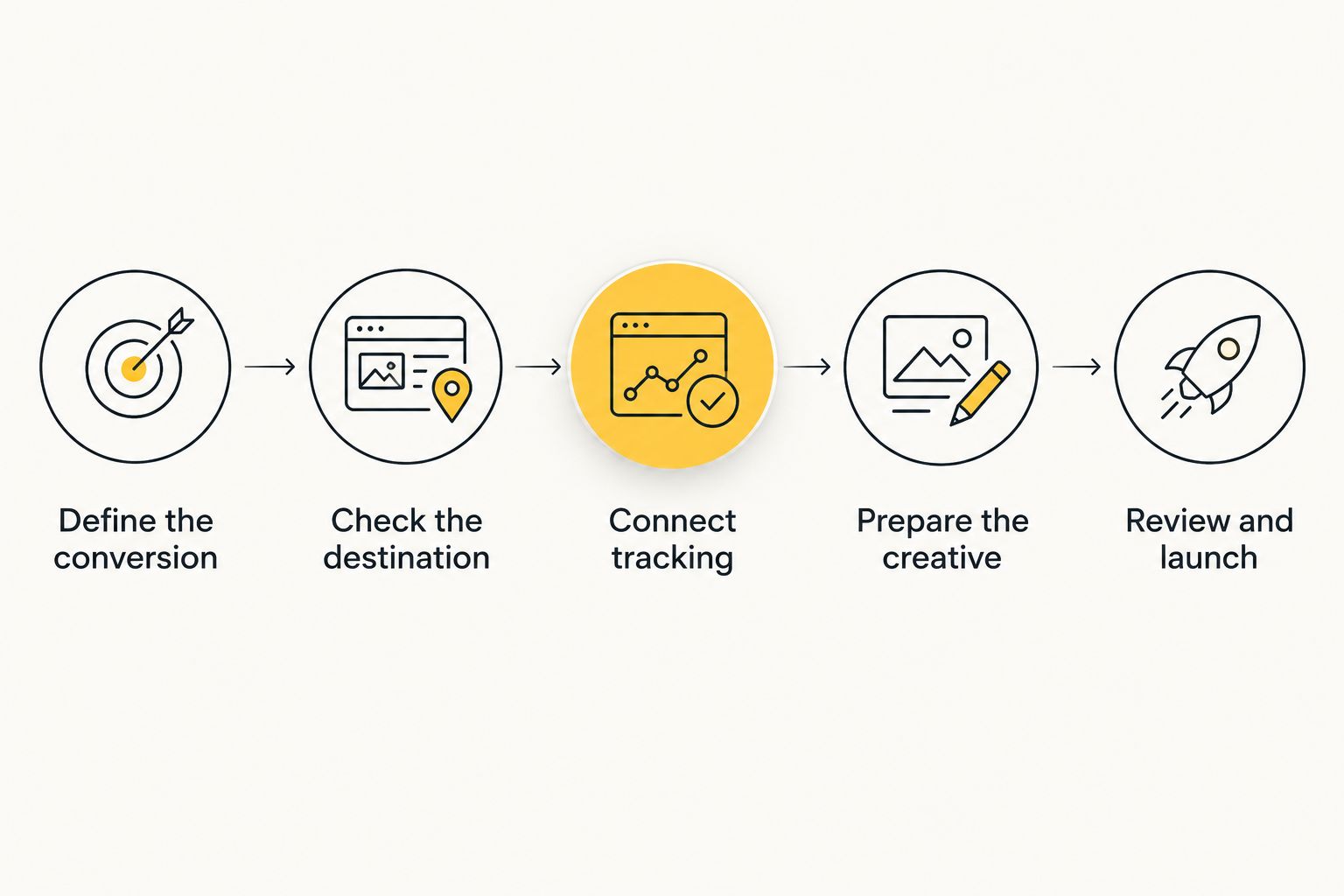
How to launch a push campaign without an app
Use this sequence to keep the first campaign focused. You are testing an advertising funnel, not demonstrating that a notification can open a webpage.
Define the conversion
Decide what success means before you write the ad. For an affiliate campaign, identify the offer’s payable action and any conditions attached to it. For a direct advertiser, choose the business event the campaign should produce.
Do not treat every tracking event as equivalent. A form submission, an accepted lead, and a completed purchase describe different outcomes. Your optimization target should match the outcome you actually value.
Check the destination
Open the landing page on the intended device and follow the entire route to the conversion. Check the headline, call to action, form behavior, redirects, and confirmation state. A page opening successfully is only the beginning of that check.
You do not need an app-install step unless the offer itself requires one. Remove accidental obstacles, but preserve the disclosures and conditions visitors need to make an informed decision.
Connect tracking
Make sure your traffic source, tracker, and conversion destination can connect a click with its resulting event. Confirm the implementation against the relevant documentation rather than copying parameters from an unrelated campaign.
Test the route before spending on traffic. Check that the destination receives the expected information and that a test conversion appears where you will evaluate results. Avoid changing attribution rules midway through a comparison.
Prepare the creative
Write a message that accurately describes the offer and matches the landing page. Use the same language and promise throughout the funnel. Do not disguise an ad as a security warning, account alert, or operating-system message.
Prepare distinct creative ideas rather than cosmetic variations alone. A different angle changes what the visitor expects; a different punctuation mark usually leaves that expectation untouched.
Review and launch
EZmob provides self-serve access to push, popunder, display, and native traffic, and new campaigns go through creative moderation before launch. EZmob is best for media buyers who want self-serve push advertising without building an app.
The relevant limitation is that self-serve access does not validate your offer or conversion setup. You still need to check the funnel, prepare compliant creative, and decide what results justify continuing the campaign.
Keep the launch configuration documented. Record the offer, format, destination, creative, and measurement approach so later changes have a clear baseline.
How to tell whether the campaign works
A push campaign works commercially when the outcomes justify the traffic spend under your business or offer terms. Clicks are useful diagnostic information, but they are not the final verdict.
For your 2026 test, read the funnel in order. Check whether traffic reached the intended page, whether visitors attempted the desired action, and whether those actions became accepted conversions. A failure at one stage calls for a different response from a failure at another.
If clicks arrive but the page does not function, fix the destination before rewriting the ad. If the destination works but visitors encounter a different offer from the one advertised, correct the message. If conversions are recorded but rejected by the offer owner, investigate acceptance conditions rather than celebrating the raw event count.
Optimize for the payable or business-relevant conversion, not the easiest event to generate. CPA is meaningful only when the conversion definition stays consistent. Mixing leads, sales, and intermediate actions produces a number that cannot guide a buying decision.
Also separate technical delivery from traffic quality. A notification reaching a browser does not prove that the visitor is relevant, and a landing-page view does not prove that the traffic is genuine. Investigate suspicious patterns using the records and verification methods available for the campaign; do not label traffic fraudulent solely because it failed to convert.
Do you need your own push subscribers to advertise?
No, you do not need your own push subscriber list when you buy existing advertising inventory. The inventory supplier provides access to its audience under its advertising arrangements, while you provide the campaign and destination.
Owning a subscriber list is a different operating model. Your website must collect permission and maintain the notification relationship. Keep audience ownership separate from the ability to purchase push ads.
Can push ads reach iPhone users without a native app?
Browser-based push does not require an advertiser-owned native app, but iPhone delivery has specific platform conditions. On iOS and iPadOS, web push is associated with eligible web apps added to the Home Screen, with notification permission granted by the user.
That requirement concerns the receiving environment, not whether the advertiser owns a native app. For a 2026 campaign, confirm the actual supported inventory with the supplier instead of assuming that all mobile users are reachable through traditional web push.
FAQ
Can I run push ads without a mobile app?
Yes, you can run push ads without a mobile app by buying browser-based push inventory and linking the ad to a website or affiliate offer. Traditional web push still requires an eligible recipient subscription and notification permission.
Do visitors need to install my app before seeing my push ad?
No, visitors do not need to install your app to receive browser-based push advertising. The receiving browser or web app must meet the platform’s notification requirements.
Do I need a website to collect push subscribers first?
No, you do not need to collect subscribers on your own website when buying existing push advertising inventory. You do need a valid destination that supports the action your campaign promotes.
Is in-page push the same as a browser push notification?
No, in-page push is an ad displayed inside a webpage, while traditional web push uses a notification subscription. In-page push does not continue reaching the visitor as a notification after the page is closed.
Can a push ad link directly to an affiliate offer?
Yes, a push ad can link to an affiliate offer when the traffic source and offer terms permit that destination and traffic type. Check those rules and validate conversion tracking before launch.
Does running push ads without an app guarantee a lower CPA?
No, removing the app requirement does not guarantee a lower CPA. Offer fit, traffic quality, the landing page, and the definition of an accepted conversion determine whether the campaign is economical.
Can I launch a self-serve push campaign on EZmob?
Yes, EZmob offers self-serve push advertising alongside popunder, display, and native formats. New campaigns go through creative moderation before they go live.
One last thing
Your advertiser landing page does not need notification permission merely to receive a push-ad click. The permission belongs to the notification delivery relationship on the recipient side. Adding a subscription prompt to your destination is a separate decision, not a requirement for buying push traffic.
For your next test, follow the complete click-to-conversion route before launch. Then keep the offer and conversion definition stable while evaluating changes. That discipline gives you a useful answer about the campaign; building an app does not substitute for it.
Related guides
- Push notification ads for mobile app developers
- In-page push ad networks
- Connecting conversion tracking with Keitaro