
Publisher approval on an ad network has no single turnaround time: use the network’s stated review window for the property you submit, not a general estimate. Account registration, property approval, and live ad delivery are separate milestones, so an approved account does not establish that your website is ready to earn. For your 2026 launch plan, confirm what the review covers and what action remains before scheduling monetization.
- EZmob supports publisher monetization through pop, push, display, and native formats; choose according to your placement needs.
- For a publisher approval time ad network comparison, separate account access, property review, and live ad delivery.
- Use the network’s stated review window, not another publisher’s anecdote, to plan website monetization.
- Before following up, identify the exact property, current status, submission time, and outstanding request.
Why this matters
Approval is a status, not proof of working monetization. You need to know whether the network has accepted your account, accepted your property, or enabled the placement you intend to use. Those distinctions determine your next move.
A publisher choosing an ad network for website monetization needs more than a fast application response. The format must fit the property, the implementation must work, and the reporting must show that delivery has started.
In 2026, keep your launch checklist tied to those outcomes. Do not announce a monetization launch because you received a welcome email, and do not replace an existing placement before you have checked the new setup.
How long does publisher approval take on an ad network?
The useful answer is the review window attached to your specific submission. If the network communicates a deadline, check whether it covers an account, a website, an app, or an individual placement. A timeline for one does not establish a timeline for the others.
Use the following table to interpret approval messages. These are workflow distinctions to check, not a claim that every network uses these exact dashboard labels.
| Milestone | What to establish | What it does not establish | Your next action |
|---|---|---|---|
| Account access | You can enter the publisher account | Your property is approved | Find the property submission or status |
| Property submitted | The intended website or app is recorded | Review is complete | Check for outstanding requests |
| Property approved | The submitted property has been accepted | Every placement is live | Confirm the permitted implementation |
| Placement configured | The ad integration is installed or configured | Ads are delivering correctly | Test the placement on the live property |
| Delivery confirmed | Ads appear and reporting records activity | Monetization meets your goals | Evaluate results and visitor experience |
Ask what has been approved before asking how long approval took. That gives you a usable comparison between networks and prevents you from treating different stages as the same result.
How to establish your actual approval timeline
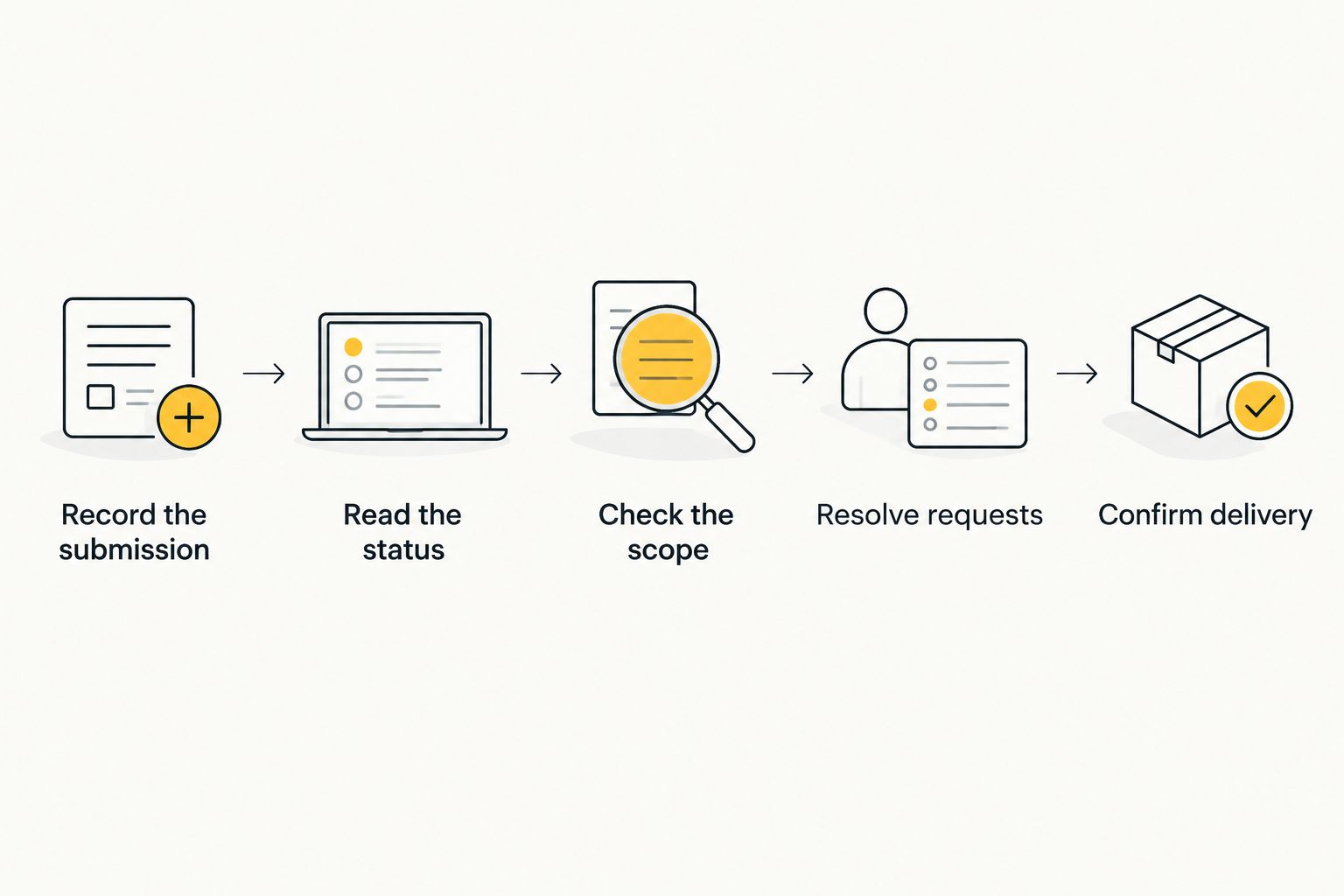
- Record the submission. Save the property identifier, submitted domain or app, and submission timestamp. Keep the confirmation message with the application record.
- Read the status. Copy the current wording exactly. Do not translate pending, approved, or action required into a different conclusion.
- Check the scope. Establish whether the message refers to account access, property review, or placement activation. Ask for clarification when the message does not identify the object being reviewed.
- Resolve requests. Respond to any stated request using the existing application or support conversation. Include the relevant property identifier so the response is attached to the right submission.
- Confirm delivery. After approval, follow the implementation instructions and check the live placement. Record the delivery milestone separately from the approval milestone.
This record helps you distinguish review time from time spent completing an application or implementing ads. It also gives support a specific issue to answer instead of a broad request for an update.
Why publisher approval time varies
Treat an approval estimate as meaningful only when its scope and conditions are clear. For a 2026 network comparison, use these factors to check whether two quoted timelines describe the same process.
- Review scope. Account registration and property acceptance are different decisions. Ask which decision the stated window covers.
- Submission completeness. Check every field and requested document against the application instructions. An unanswered request is an action item, not evidence of a completed review.
- Property access. Open the submitted website or app listing yourself. If the reviewer needs access that is restricted, follow the network’s instructions for providing it.
- Inventory and format. State whether you are submitting a website or app and which placement you intend to use. Do not assume permission for one format covers another.
- Timeline definition. Identify when the network starts its stated review window and whether it specifies business days or another measure. Use that definition when deciding whether a deadline has passed.
These checks do not establish a faster turnaround. They establish whether you have submitted what the network requested and whether you are measuring the correct interval.
Compare equivalent milestones, not isolated speed claims. A quick account confirmation and a completed property review answer different questions, even when both are described informally as approval.
What should you prepare before submitting your website?
Prepare a clear description of the property and the monetization you want to implement. Give the network accurate information rather than trying to make your inventory resemble someone else’s accepted application.
Use the actual application requirements as your checklist. Do not collect documents or install code solely because an unrelated network required them.
| Preparation item | What to check | Why you need it |
|---|---|---|
| Property details | Submitted domain or app matches the intended property | Keeps the application tied to the correct inventory |
| Access | The relevant content is reachable under the stated review process | Lets you address access questions directly |
| Contact information | You can receive and answer application messages | Prevents missed requests |
| Format choice | The intended placement is clearly identified | Keeps approval questions specific |
| Implementation ownership | You know who will configure the placement | Separates review from setup work |
Avoid submitting a property and then changing its core details without checking how the network handles updates. Keep a record of what you submitted, particularly when you manage several sites or apps.
For an affiliate publisher, also distinguish the traffic you own from traffic you buy. A publisher application concerns monetizing your inventory; an advertiser account concerns buying inventory to promote an offer.
Is instant publisher signup the same as instant approval?
Instant publisher signup means account creation is immediate; it does not, by itself, establish property approval or live ad delivery. Read the actual status attached to your website or app before installing or activating a placement.
This distinction also separates publishers from media buyers. Advertiser creative moderation concerns campaigns submitted by advertisers, not the approval status of a publisher’s property.
The distinction matters when reading a network’s onboarding material. A self-serve advertising workflow is not evidence of a publisher review deadline.
When should you contact support about a pending application?
Contact support when the network’s stated review window has passed, when the status requests an action you cannot complete, or when you need clarification about what is under review. If no deadline is stated, ask for the applicable window rather than assigning one yourself.
For a 2026 application, include a concise record:
- The publisher account identifier, where applicable.
- The submitted domain or app identifier.
- The submission timestamp.
- The exact current status.
- Any request you have already answered.
- The specific question you need resolved.
Ask whether the property is awaiting review, awaiting information, or accepted but awaiting implementation. That question focuses the reply on a decision you can act on.
Keep the follow-up attached to the original application where possible. A fresh application is not a status update, and it does not tell you what happened to the first submission.
Can you start earning as soon as your property is approved?
Property approval alone does not confirm earnings: the placement must be implemented, delivery must work, and reporting must record the resulting activity. Check those conditions before treating approval as a completed monetization launch.
Do not confuse an approved property with a successful placement. Review where the ad appears, whether the page remains usable, and whether the reporting corresponds to the property you configured.
Your first operational question is whether the setup works. Your next question is whether that setup fits your audience and business goals.
What should you check after approval?
Start with the approved property and the format you intend to run. Follow the network’s current implementation instructions rather than borrowing a code snippet or setup guide from a different platform.
Use this launch checklist:
- Property match: Confirm the configuration belongs to the approved domain or app.
- Placement behavior: Open the live property and observe what visitors encounter.
- Device behavior: Check the devices your audience uses instead of testing only your own desktop browser.
- Reporting match: Confirm that reported activity belongs to the intended property and placement.
- Visitor experience: Check whether monetization interferes with the content or action visitors came to complete.
A setup check is not a performance benchmark. It establishes that your implementation and reporting are connected before you evaluate monetization results.
Keep approval, installation, delivery, and performance as separate entries in your launch record. If something fails, that separation tells you whether to ask about review status, implementation, or reporting.
Where EZmob fits for publishers
EZmob is best suited to website and app owners seeking pop, push, display, and native monetization. That is a format-fit recommendation, not a claim about approval speed.
The advantage of EZmob’s publisher ad network is the stated choice of monetization formats. The trade-off is that format choice still requires a placement decision: acceptance alone does not tell you which format fits your property’s visitor experience.
Choose based on the inventory you own and the placement you intend to implement. Keep the review question separate: request the applicable publisher approval window and confirm the status of your own property rather than treating self-serve advertiser access as a publisher timing guarantee.
FAQ
How long does publisher approval take on an ad network?
Publisher approval time depends on the network’s stated review window and the scope of your submission. Confirm whether the timeline covers account access, property acceptance, or placement activation.
Does creating a publisher account mean my website is approved?
Creating a publisher account does not by itself establish website approval. Check the status of the submitted property and any outstanding review requests.
What should I do if my publisher application is pending?
Check the current status and respond to any outstanding request first. When you contact support, include the property identifier, submission timestamp, and exact status wording.
Can I speed up publisher approval by applying again?
A second application does not establish a faster review. Follow up on the existing submission so you can identify its status and any action required.
Is advertiser creative moderation the same as publisher approval?
Advertiser creative moderation and publisher approval concern different submissions. Creative moderation checks an advertiser’s campaign, while a publisher needs confirmation about the property being monetized.
Does EZmob support website and app monetization?
EZmob supports website and app owners monetizing traffic with pop, push, display, and native formats. Select the intended format and confirm the applicable onboarding requirements before launch.
Can an approved publisher property earn before ads are installed?
Property approval alone does not create a working ad placement. Complete the required implementation and confirm delivery and reporting before evaluating monetization results.
One last thing
Record two milestones: property approved and delivery confirmed. Keeping them separate prevents an implementation problem from being described as an approval delay.
For your next 2026 launch, put both milestones in the same operational record as the original submission. When someone asks why monetization has not started, you can identify the exact unfinished step instead of restarting the application process.
Related guides
- Website monetization for bloggers
- Ad monetization for streaming website owners
- Native advertising for content publishers
Ready to submit your property? Monetize your traffic with EZmob.